
아두이노 광학 수위 센서: 배선 & 코드 가이드
아두이노 광학 수위 센서 연결은 DIY 수조 프로젝트에 간단합니다: 센서 VCC를 Arduino 5V에 연결하세요, 센서 GND에서 아두이노 GND로, 그리고 센서의 디지털 OUT 와이어를 D2와 같은 GPIO 핀으로 연결한다. 스케치에 GPIO가 높음 또는 낮음으로 표시되어 있습니다, 그 결과를 사용해 표시 LED를 전환합니다, 버저, 릴레이 모듈, 또는 펌프 제어 회로.
이 가이드는 실용적인 배선에 초점을 맞추고 있습니다, 스케치 구조, 릴레이 안전, 디바운스 핸들링, 그리고 브레드보드 프로토타입이 생산 준비가 된 센서 설계가 되어야 하는 시점입니다. 광학 감지 기초, 우리 전체 광학 레벨 센서 여기서 모든 이론을 반복하기보다는 설명을 해주세요.
기본 아두이노 후크업: 5V, GND, GPIO로 나갑니다
아두이노와 함께 사용되는 대부분의 5V 광적 적외선 수위 센서 모듈은 세 개의 신호 측 연결을 가지고 있습니다:
- VCC / + → 아두이노 5V
- GND / - → 아두이노 GND
- 나가세요 / 의 / 신호 → 아두이노 디지털 입력 핀, 예를 들어 D2
배선 후, Arduino 시리얼 모니터를 열고 핀 상태를 출력하세요. 센서 팁을 공중에서 테스트해 보세요, 그다음 물로 만져보세요. 한 상태는 HIGH를, 다른 하나는 LOW를 표시합니다. 모든 모듈이 동일하게 동작한다고 가정하지 마세요. 어떤 보드는 마르면 HIGH, 젖으면 LOW를 출력합니다; 회로에 따라 다른 경우는 역전됩니다, 트랜지스터 출력, 또는 풀업 설계.
시각적 참고용으로, 저희 전용 내용을 참조하세요 배선도 가이드.
부품 및 핀 배치 표
| 항목 / 핀 | 연결됨 | 목적 | 노트 |
|---|---|---|---|
| 아두이노 우노, 나노, 또는 호환 보드 | USB / 5V 공급 | 센서를 읽고 출력 논리를 제어합니다 | 펌프를 추가하기 전에 USB로 테스트부터 시작하세요 |
| 5V 광학 적외선 수위 센서 모듈 | 5V, GND, GPIO | 한 액체 수준 지점에서 습기/건조 상태를 감지합니다 | A 5V IR 센서 모듈 아두이노 프로토타입에 가장 쉽습니다 |
| 센서 VCC | 아두이노 5V | 센서 모듈에 전원을 공급합니다 | 연결 전에 모듈이 5V를 지원하는지 확인하세요 |
| 센서 GND | 아두이노 GND | 공통 참고 | 안정적인 측정을 위해 필요 |
| 센서 꺼짐 / 의 | Arduino D2 또는 다른 GPIO | HIGH/LOW 신호 전송 | 쓰다 입력 또는 INPUT_PULLUP 모듈 출력 기준 |
| 릴레이 모듈 IN | 아두이노 출력 핀, 예를 들어 D8 | 펌프 스위칭 제어 | 릴레이 모듈을 사용하세요, Arduino에서 직접 가져온 노출 릴레이 코일이 아닙니다 |
| 릴레이 모듈 VCC/GND | 5V 릴레이 전원 공급 / 그라운드 | 파워 릴레이 전자 장치 | 일부 릴레이 보드는 Arduino가 안전하게 공급할 수 있는 것보다 더 많은 전류가 필요합니다 |
| 펌프 | 릴레이 접점 측 + 펌프 공급 | 물을 움직인다 | 펌프 공급은 펌프 전압과 전류에 맞아야 합니다 |
| 선택 사양 LED / 버저 | 아두이노 출력 핀 | 안전한 첫 번째 시험 하중 | 펌프 연결 전에 로직 테스트 |
실제 물 프로젝트에서 광학 센서가 어떻게 작동하는지에 대해
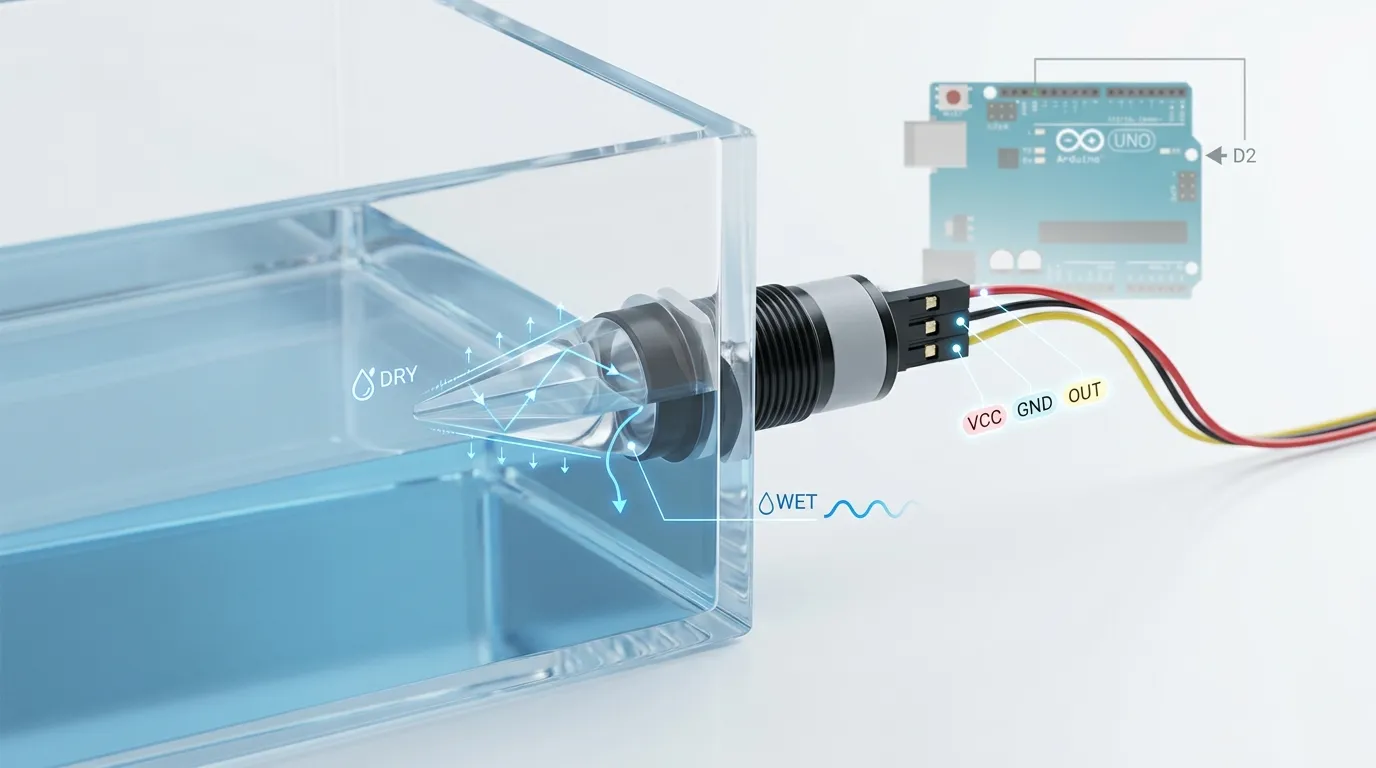
광학 수위 센서는 일반적으로 IR LED를 사용합니다, 광트랜지스터 또는 포토다이오드, 그리고 성형된 프리즘 팁. 프리즘이 마른 상태일 때, 적외선 빛은 수신기 내부로 반사됩니다. 팁이 물이나 다른 액체에 젖었을 때, 반사는 굴절 경계가 변하기 때문에 변합니다. 센서 전자장치는 그 광학 변화를 전기적 출력으로 변환합니다.
아두이노 DIY 작업을 위해, 보통 최종 신호에 신경 쓰게 됩니다: 습식 또는 건조, 높거나 낮아. 그렇지만, 물리적 센서는 여전히 중요합니다. 작은 수족관 저수지, 커피 머신 탱크, 냉각수 병, 그리고 오일 용기는 다른 젖은 재료가 필요할 수 있습니다. 일반적인 생산 선택지로는 소형 수용 PSU 플라스틱이 있습니다, 화학적 내성을 위한 PTFE, 316 견고한 산업용 탱크용 스테인리스 스틸, 그리고 특정 깨끗하거나 고투명한 감지 설계를 위한 유리.
장착은 성능에도 영향을 미칩니다. 측면에 장착된 나사식 센서는 탱크 벽을 통해 고정된 수위를 감지합니다. 수직 프로브는 상단이나 뚜껑에서 사용할 수 있습니다. 나사산 옵션, 플랜지 장착, 케이블 출구 방향, 실링 개스킷, 그리고 프리즘 위치는 센서가 실제 액체 수준을 감지하는지, 아니면 갇힌 물방울만 보는지에 영향을 미칩니다, 거품, 또는 첨벙거리는 소리.
아두이노를 위해, 첫 번째 시험은 단순하게 하세요: 센서 팁을 공중에 들고 있습니다, 그다음 프리즘 끝만 물에 담가요. 모듈이 완전히 밀봉되어 잠수되도록 설계되지 않은 경우에는 노출된 회로 기판을 잠기지 마세요.
거대한 코드 덤프 없는 스케치 구조
이 프로젝트에 적합한 신뢰할 만한 Arduino 스케치는 작게 정리해야 합니다, 명확한 부분:
- 핀 정의
센서 입력에 핀 하나로 설정하세요, 예를 들어 D2, 릴레이 출력용 핀 하나, 예를 들어 D8. - 설정 시 핀 모드를 설정하세요
센서 핀이 입력이 됩니다. 릴레이 핀이 출력이 됩니다. 루프가 시작되기 전에 릴레이를 안전 기본 상태로 설정하세요. - 센서 상태 읽기
쓰다 디지털리드() 센서 출력 핀에서 HIGH 또는 LOW를 읽기 위해. - 맵 웻/드라이 논리
실제 모듈을 테스트해서 HIGH가 습식인지 건식인지 결정하세요. 그 로직을 명확히 저장해서 실수로 펌프 동작을 반전시키지 않도록 하세요. - 릴레이 제어
수조가 부족할 때, 펌프 릴레이를 켜세요. 액체가 센서 지점에 도달하면, 릴레이 꺼. 오버플로우 사용, 논리는 반대로 될 수도 있습니다. - 진단 메시지 인쇄
테스트 중, 인쇄 "젖은 사람"," "건조," "계속 펌프,"그리고 시리얼 모니터로 "pump off". 필요하다면 메시지를 삭제하거나 줄이세요.
짧은 스케치면 충분해요, 하지만 센서의 습식/건식 출력을 확인하기 전에 무작위 코드 블록을 복사하는 것은 피하세요. 가장 흔한 실수는 모든 것을 올바르게 배선했는데 릴레이 조건에서 역전된 논리를 사용하는 것입니다.
디바운싱과 오위 트리거 방지
광학 센서는 많은 플로트 스위치보다 더 빠릅니다, 이 점이 유용합니다, 하지만 펌프 시스템은 여전히 불안정한 수치를 만들 수 있습니다. 물결, 거품, 프리스크에 떨어진 물방울, 펌프에서 발생하는 전기 잡음, 또는 느슨한 점퍼 와이어가 Arduino에 빠른 HIGH/LOW의 변화를 일으킬 수 있습니다.
간단한 소프트웨어 필터링을 사용하세요:
- 릴레이 상태를 바꾸기 전에 센서를 여러 번 읽으세요.
- 행동하기 전에 200–1000ms 동안 동일한 습기/건조 상태가 필요합니다.
- 릴레이 잡음을 막기 위해 최소 펌프 작동 시간 또는 최소 펌프 오프 시간을 추가하세요.
- 시리얼 모니터를 사용해 깜빡임이 물 움직임에서 오는지 전기 소음 때문인지 확인하세요.
- 펌프 배선은 가능한 한 센서 신호 배선에서 멀리 떨어뜨리세요.
- 하나의 약한 USB 포트로 모든 전력을 공급하기보다는 안정적인 전원 공급을 사용하세요.
웨이브나 스플래시 공격이 있는 탱커, 물이 반복적으로 닿고 끝을 떠나는 프리즘에 장착하지 마세요. 센서를 좀 더 차분한 위치에 두세요, 적절하다면 작은 스틸 튜브를 사용하세요, 또는 시간 지연을 추가해 Arduino가 안정적인 수준에만 반응하도록 할 수도 있습니다.
릴레이와 펌프에 안전하게 전원 공급하기
아두이노 핀은 펌프를 직접 전원으로 공급할 수 없습니다. 또한 노출된 릴레이 코일을 직접 구동해서는 안 됩니다. 아두이노 출력 핀은 제어 신호만 릴레이 모듈에 보내야 합니다, MOSFET 드라이버, 또는 모터 드라이버 회로.
일반적인 안전 릴레이 배치는 다음과 같습니다: Arduino는 D2에서 광학 센서를 읽습니다, 그 후 D8의 릴레이 모듈 입력을 구동합니다.. 릴레이 모듈은 접촉 쪽에서 펌프의 별도 전원선을 스위칭합니다. 펌프 전원 공급 장치는 펌프 전압과 전류에 맞아야 합니다, 아두이노는 자체 논리 공급원에 의존하고 있습니다.
펌프를 교체하기 전에 이 지점들을 꼭 확인하세요:
- 릴레이 접촉 등급은 펌프 부하에 적합해야 합니다.
- 릴레이 모듈은 Arduino 로직과 호환되어야 합니다.
- 펌프 공급은 아두이노로 역으로 공급되어서는 안 됩니다.
- 릴레이 보드가 제어 측에서 공통 접지가 필요하다면요, 올바르게 연결하세요.
- 모듈에 이미 보호가 포함되어 있지 않은 경우, 코일과 모터에 플라이백 보호를 사용하세요.
- 적절한 인클로저에 전원 전원을 넣고, 교류 전원이 필요하면 전문 전문가를 받으세요.
- 펌프를 연결하기 전에 먼저 LED나 멀티미터로 테스트하세요.
소형 DC 펌프의 경우, 논리 수준의 MOSFET 모듈은 기계식 릴레이보다 더 조용하고 오래 지속될 수 있습니다. AC 펌프용, 적절한 등급의 릴레이를 사용하세요, SSR, 또는 부하 유형에 맞게 설계된 접촉기.
DIY 프로토타입 vs 제품화된 광학 레벨 센서
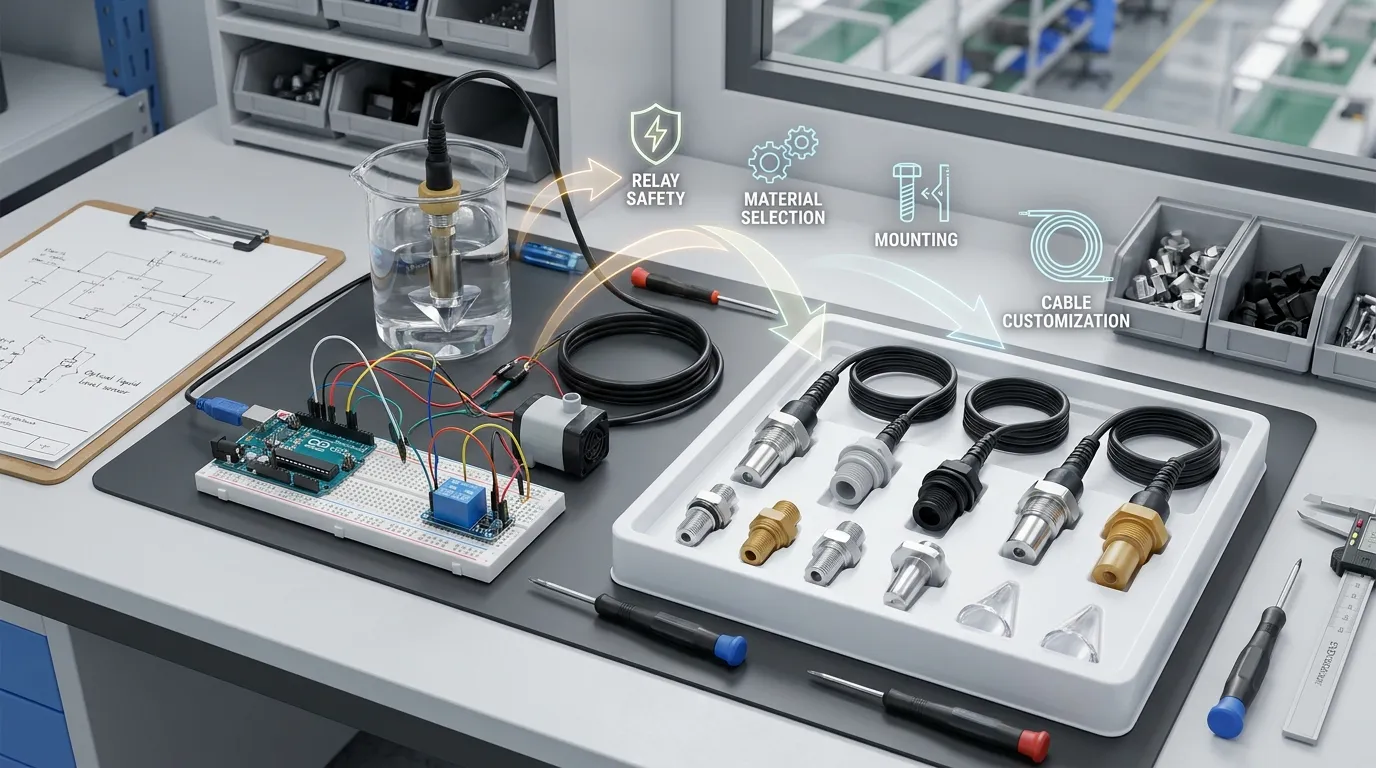
아두이노 세팅은 학습에 매우 좋습니다, 개념 증명 테스트, 수족관 보충 실험, 소형 저수지 경보, 초기 제품 검증. 상업용 장비에 자동으로 준비되는 것은 아닙니다.
제품화된 센서 설계는 밀봉 처리를 반드시 고려해야 합니다, 케이블 스트레인 릴리프, 커넥터 선택, 습윤 재료 적합성, 출력 유형, 장착 나사산, 반복성, 양산 품질 관리, 그리고 장기간 물에 노출되는 것들, 기름, 세정제, 냉각수, 증기, 또는 화학 물질. 산업용 및 OEM 시스템도 NPN이 필요할 수 있습니다, PNP, 푸시-풀, 아날로그 4–20 mA, 맞춤 케이블 길이, 패널 장착, 스테인리스 바디, PTFE 차체, 또는 성형 탱크에 맞는 컴팩트 프리즘 기하학.
HojellyTek은 광전 광학 감지와 액체 수위 감지에 중점을 둔 선전의 제조업체이자 수출업체입니다. 제작 프로젝트, 우리 사내 R&D 팀은 OEM/ODM 센서 구성을 지원할 수 있습니다, 주택 재료 선택, 커넥터 및 케이블 커스터마이징, 그리고 가전제품 통합, 탱크, 산업 장비, 스마트 액체 모니터링 제품. Tuya/Smart Life 통합은 단순한 Arduino 전용 프로토타입보다는 연결된 탱크 레벨 장치에도 관련이 있을 수 있습니다.
우리는 미국으로 수출합니다, 우린, 그리고 인도, 그리고 팀이 DIY 아두이노 테스트에서 제조 가능한 광학 레벨 감지 솔루션으로 전환할 수 있도록 도울 수 있습니다.
실제 조립을 위해 센서를 주문하기 전에 확인해야 할 사항
브레드보드를 넘어서기 전에, 이 세부사항들을 준비하세요:
| 요구 | 왜 중요한가 |
|---|---|
| 액체형 | 물, 기름, 냉각수, 세정제, 화학 혼합물은 서로 다른 습윤 재료가 필요할 수 있습니다 |
| 센서 상태 | 제어 보드에 젖어야 하는지 확인 = HIGH, 젖은 = 저음, NPN, PNP, 또는 아날로그 출력 |
| 공급 전압 | 아두이노 프로토타입은 종종 5V를 사용합니다, 하지만 생산 보드는 서로 다른 논리 레일을 사용할 수 있습니다 |
| 장착 방식 | 스레드, 플랜지, 최상위 입국, 측면 진입, 또는 맞춤형 탱크 장착으로 센서 설계가 변경됩니다 |
| 차체 재질 | PSU, PTFE, 316 스테인리스 스틸, 그리고 유리는 다양한 환경을 지원합니다 |
| 케이블 및 커넥터 | OEM 제품은 방수 커넥터가 필요할 수 있습니다, 맞춤 케이블 길이, 또는 성형 리드 |
| 펌프 제어 방법 | 릴레이, MOSFET, SSR, 또는 컨트롤러 입력은 펌프 전압과 부하에 따라 달라집니다 |
| 환경 | 응결, 진동, 온도, 거품, 비말, 청소 사이클은 신뢰성에 영향을 미칩니다 |
관련 아두이노 및 싱글보드 컴퓨터 조립
같은 프로젝트를 다른 컨트롤러로 만드는 경우에는, 우리의 라즈베리 파이 버전. 배선 논리도 비슷합니다, 하지만 GPIO 전압과 입력 보호는 다릅니다, 따라서 Arduino 5V 배선을 Raspberry Pi에 직접 복사하지 마세요.
FAQ
Arduino 광학 수위 센서를 어떻게 배선하나요??
VCC를 Arduino 5V에 연결하세요, GND에서 아두이노 GND로, 그리고 D2와 같은 GPIO로 디지털 출력을 제공합니다. 그다음 핀을 읽으세요. 디지털리드() 그리고 프리즘 팁이 젖어 있을 때 모듈이 HIGH인지 LOW인지 확인하세요.
젖었을 때 광학 수위 센서가 HIGH로 표시되나요??
모듈에 따라 다릅니다. 젖었을 때 출력이 높게 나오는 경우도 있습니다; 다른 경우는 젖었을 때 출력이 낮습니다. 펌프나 릴레이를 연결하기 전에 반드시 시리얼 모니터에서 건식 및 습식 상태를 테스트하세요.
아두이노가 센서 신호로 펌프를 제어할 수 있나요??
예, 하지만 Arduino는 릴레이 모듈을 제어해야 합니다, MOSFET 드라이버, 또는 모터 드라이버. 아두이노 핀에서 직접 펌프를 공급하지 마세요.
왜 내 릴레이가 빠르게 켜졌다 꺼졌다 하는 걸까요?
릴레이 채터는 보통 센서 측정값이 불안정해서 발생합니다, 파도, 비말, 펌프 전기 잡음, 또는 디바운스 로직의 누락. 안정 상태 지연 추가하기, 최소 펌프 가동 및 중단 시간, 더 깨끗한 배선, 그리고 적절한 전원 공급 장치.
같은 센서로 오일이나 화학물질을 사용할 수 있나요??
항상 그런 것은 아닙니다.. 감지 원리가 작동할 수도 있습니다, 하지만 습윤 재료 호환성은 매우 중요합니다. 기름, 냉각수, 세정제, 화학물질은 PTFE를 필요로 할 수 있습니다, 316 스테인리스 스틸, 잔, 또는 다른 적합한 하우징 재료.
DIY 아두이노 세팅을 OEM 센서로 교체하는 게 언제 좋을까요?
프로젝트가 제품이 되면 OEM 센서로 전환하세요, 기기, 산업용 탱크, 또는 고객 대면 시스템. WhatsApp으로 HojellyTek에 견적을 요청하거나 액체 종류를 이메일로 문의하세요, 전압, 출력, 장착, 차체 재질, 케이블, 그리고 예상 사용 환경.


