
Braiteoir Leibhéal Uisce Optúil Arduino: Sreangú & Treoir Cód
Tá hookup braiteoir leibhéal uisce optúil arduino simplí do thionscadal umar DIY: braiteoir VCC a nascadh le Arduino 5V, braiteoir GND go Arduino GND, agus an sreang digiteach OUT braiteoir le bioráin GPIO mar D2. Léann do sceitse an GPIO sin mar ARD nó ÍSEAL, ansin úsáideann sé an toradh chun táscaire faoi stiúir a athrú, dordánaí, Modúl sealaíochta, nó ciorcad rialaithe caidéil.
Díríonn an treoir seo ar an sreangú praiticiúil, struchtúr sceitse, Sábháilteacht sealaíochta, Láimhseáil Debounce, agus an pointe inar chóir go mbeadh fréamhshamhail breadboard ina dhearadh braiteora réidh le táirgeadh. Le haghaidh buneilimintí braite optúla, Bain úsáid as ár n-iomlán Braiteoir Leibhéal Optúil mínitheoir seachas an teoiric go léir a athrá anseo.
Hookup Arduino Bunúsach: 5V, GND, AMACH chuig GPIO
Tá trí nasc taobh comhartha ag an gcuid is mó de na modúil braiteoir leibhéal uisce infridhearg optúla 5V a úsáidtear le Arduino:
- VCC / + → Arduino 5V
- GND / - → Arduino GND
- AMACH / DE / Comhartha → Bioráin ionchuir digiteach Arduino, Mar shampla D2
Tar éis sreangú, oscail an Monatóir Sraitheach Arduino agus priontáil an staid bioráin. Tástáil an barr braiteora san aer, ansin déan teagmháil leis le huisce. Léifidh stát amháin ARD agus léifidh an ceann eile ÍSEAL. Ná glac leis go n-iompraíonn gach modúl ar an mbealach céanna. Roinnt boird aschur ARD nuair a bhíonn siad tirim agus ÍSEAL nuair a bhíonn siad fliuch; tá daoine eile inbhéartaithe ag brath ar an gciorcad, aschur trasraitheoir, nó dearadh tarraingthe suas.
Le haghaidh tagairt amhairc, féach ar ár dtiomnaithe léaráid sreangaithe treoir.
Comhpháirteanna agus Tábla Pinout
| Mír / Bioráin | Ceangail Le | Cuspóir | Nótaí |
|---|---|---|---|
| Arduino Uno, Nano, nó bord comhoiriúnach | USB / 5Soláthar V | Léann sé an braiteoir agus rialaíonn sé loighic aschuir | Tosaigh ag tástáil ó USB sula gcuireann tú caidéal leis |
| 5V modúl braiteoir leibhéal uisce IR optúil | 5V, GND, GPIO | Braitheann sé staid fhliuch / tirim ag pointe leibhéal leachtach amháin | A 5Modúl braiteoir V IR is éasca do fhréamhshamhlacha Arduino |
| Braiteoir VCC | Arduino 5V | Cumhachtaí an modúl braiteora | Deimhnigh go dtacaíonn an modúl le 5V sula nascann tú |
| Braiteoir GND | Arduino GND | Tagairt choiteann | Riachtanach le haghaidh léamha cobhsaí |
| Braiteoir AMACH / DE | Arduino D2 nó GPIO eile | Seolann comhartha ARD / ÍSEAL | Ídigh IONCHUR nó INPUT_PULLUP bunaithe ar aschur an mhodúil |
| Modúl sealaíochta IN | Bioráin aschuir Arduino, mar shampla D8 | Rialaíonn lascadh caidéil | Úsáid modúl sealaíochta, ní corna sealaíochta lom go díreach ó Arduino |
| Modúl sealaíochta VCC / GND | 5Soláthar sealaíochta V / talamh | Cumhachtaí leictreonaic sealaíochta | Teastaíonn níos mó reatha ó roinnt boird sealaíochta ná mar is féidir le Arduino a sholáthar go sábháilte |
| Caidéal | Taobh teagmhála sealaíochta + soláthar caidéil | Bogann uisce | Caithfidh soláthar caidéil voltas caidéil agus reatha a mheaitseáil |
| Faoi stiúir roghnach / dordánaí | Bioráin aschuir Arduino | An chéad ualach tástála sábháilte | Loighic tástála sula nascann tú caidéal |
Conas a iompraíonn an braiteoir optúil i dtionscadal fíor-uisce
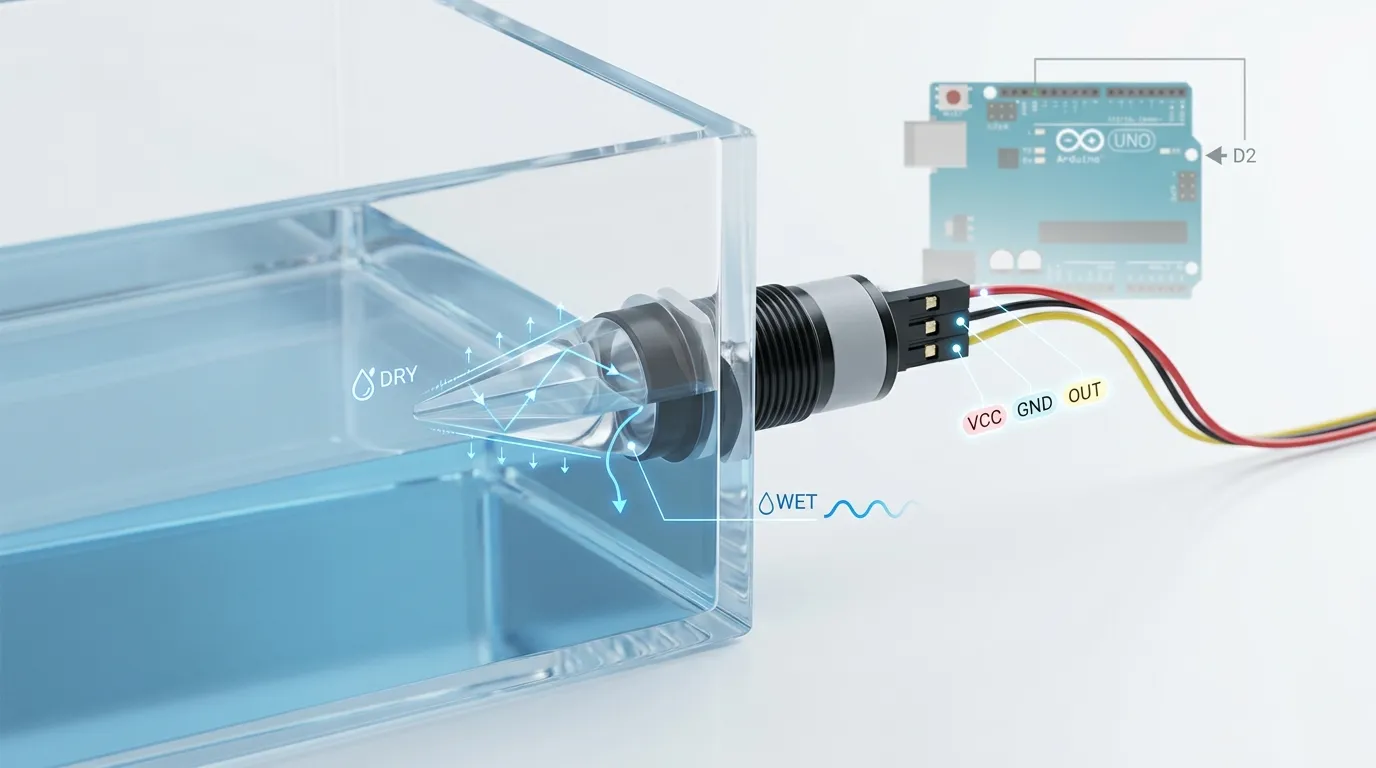
Is gnách go n-úsáideann braiteoir leibhéal uisce optúil IR LED, Fóta-trasraitheoir nó fóta-dé-óid, agus barr priosma múnlaithe. Nuair a bhíonn an priosma tirim, Frithchaitear solas infridhearg go hinmheánach i dtreo an ghlacadóra. Nuair a bhíonn an barr fliuch le huisce nó le leacht eile, Athraíonn an machnamh toisc go n-athraíonn an teorainn athraonta. Déanann an leictreonaic braiteora an t-athrú optúil sin a thiontú ina aschur leictreach.
Le haghaidh obair Arduino DIY, is gnách go bhfuil cúram ort faoin gcomhartha deiridh: fliuch nó tirim, ARD nó ÍSEAL. Cén dóigh faoin spéir a ...?, Tá tábhacht fós leis an braiteoir fisiceach. Taiscumar beag uisceadán, umar meaisín caife, buidéal cuisnithe, agus d'fhéadfadh go mbeadh ábhair fliucha éagsúla ag teastáil ó choimeádán ola. I measc na roghanna táirgeachta coitianta tá plaisteach PSU d'iarratais uisce dlúth, PTFE le haghaidh friotaíocht ceimiceach, 316 Cruach dhosmálta le haghaidh umair tionsclaíocha garbh, agus gloine le haghaidh dearaí braite glana nó ardshoiléireachta áirithe.
Athraíonn feidhmíocht freisin. Braitheann braiteoir snáithithe taobh-suite leibhéal seasta tríd an mballa umar. Is féidir probe ingearach a úsáid ón mbarr nó ón gclúdach. Roghanna snáithithe, Gléasta flange, Treo scoir cábla, gasket séalaithe, agus seasamh priosma go léir tionchar a imirt ar cibé an bhfeiceann an braiteoir an leibhéal leachtach fíor nó braoiníní gafa amháin, cúr, nó splancscáileán.
Le haghaidh Arduino, Coinnigh an chéad tástáil simplí: Coinnigh an leid braiteora san aer, ansin tumadh ach an barr priosma isteach in uisce. Ná báim cláir chiorcaid nochta mura bhfuil an modúl séalaithe go hiomlán agus deartha le haghaidh tumoideachais.
Struchtúr Sceitse Gan Dumpáil Cód Ollmhór
Ba chóir sceitse iontaofa Arduino don tionscadal seo a eagrú i mbeag, páirteanna soiléire:
- Sainmhínigh bioráin
Socraigh bioráin amháin don ionchur braiteora, mar shampla D2, agus bioráin amháin don aschur sealaíochta, mar shampla D8. - Socraigh modhanna bioráin sa socrú
Éiríonn an bioráin braiteora ionchur. Éiríonn an bioráin sealaíochta aschur. Socraigh an sealaíocht go dtí an staid réamhshocraithe sábháilte sula dtosaíonn an lúb. - Léigh staid an braiteora
Ídigh digiteachLéigh() a léamh ARD nó ÍSEAL ón bioráin aschuir braiteora. - Loighic fliuch/tirim a mhapáil
Déan tástáil ar do mhodúl iarbhír agus déan cinneadh an gciallaíonn ARD fliuch nó tirim. Stóráil an loighic sin go soiléir ionas nach ndéanann tú iompar an chaidéil a aisiompú trí dhearmad. - Rialú an sealaíochta
Má tá an umar íseal, Cas an sealaíocht caidéil air. Má shroicheann an leacht an pointe braiteora, Múch an sealaíocht. Le haghaidh úsáide ró-shreabhadh, Is féidir an loighic a aisiompú. - Priontáil teachtaireachtaí diagnóiseacha
Le linn na tástála, priontáil "fliuch," "tirim," "Caidéal ar," agus "caidéal amach" go Monatóir Sraitheach. Bain nó laghdaigh teachtaireachtaí níos déanaí más gá.
Tá sceitse gearr ceart go leor, ach seachain bloc cód randamach a chóipeáil sula ndeimhnítear aschur fliuch / tirim an braiteora. Is é an botún is coitianta ná gach rud a shreangú i gceart ach loighic inbhéartaithe a úsáid sa riocht sealaíochta.
Debouncing agus Cosc Truicear Bréagach
Tá braiteoirí optúla níos tapúla ná go leor lasca snámhphointe, rud atá úsáideach, Ach is féidir le córas caidéil léamha éagobhsaí a chruthú fós. Tonnta uisce, boilgeoga, braoiníní ar an bpriosma, torann leictreach ón gcaidéal, nó is féidir le sreang geansaí scaoilte a dhéanamh ar an Arduino athruithe tapa ARD / ÍSEAL a fheiceáil.
Bain úsáid as scagadh bogearraí simplí:
- Léigh an braiteoir arís agus arís eile sula n-athraíonn tú staid sealaíochta.
- Éiligh an staid fhliuch / tirim céanna ar feadh 200-1000 ms sula ngníomhaíonn tú.
- Cuir íosta ama reatha caidéil nó íosta ama caidéil chun stop a chur le comhrá sealaíochta.
- Bain úsáid as Monatóir Sraitheach chun a dhearbhú an dtagann an flicker ó ghluaiseacht uisce nó torann leictreach.
- Coinnigh sreangú caidéil ar shiúl ó shreangú comhartha braiteora nuair is féidir.
- Bain úsáid as foinse cumhachta cobhsaí in ionad gach rud a chumhachtú ó chalafort USB lag amháin.
Le haghaidh umair le tonnta nó splancscáileán, Ná cuir an priosma san áit a mbuaileann uisce arís agus arís eile an rinn. Cuir an braiteoir ag pointe níos suaimhní, Bain úsáid as feadán beag stilling más oiriúnach, nó cuir moill ama leis ionas nach n-imoibríonn an Arduino ach le leibhéal cobhsaí.
Sealaíocht agus Caidéal a chumhachtú go sábháilte
Ní féidir le bioráin Arduino caidéal a chumhacht go díreach. Níor chóir dó corna sealaíochta lom a thiomáint go díreach. Níor chóir go seolfadh an bioráin aschuir Arduino ach comhartha rialaithe chuig modúl sealaíochta, Tiománaí MOSFET, nó ciorcad tiománaí mótair.
Breathnaíonn socrú sealaíochta sábháilte tipiciúil mar seo: Léann Arduino an braiteoir optúil ar D2, ansin tiomáineann an t-ionchur modúl sealaíochta ar D8. Athraíonn an modúl sealaíochta líne chumhachta ar leithligh an chaidéil ar an taobh teagmhála. Caithfidh an soláthar cumhachta caidéil an voltas caidéil agus an sruth a mheaitseáil, cé go bhfanann an Arduino ar a sholáthar loighic féin.
Seiceáil na pointí seo sula n-athraíonn tú an caidéal:
- Caithfidh an rátáil teagmhála sealaíochta a bheith oiriúnach don ualach caidéil.
- Caithfidh an modúl sealaíochta a bheith comhoiriúnach le loighic Arduino.
- Níor chóir go mbeadh an soláthar caidéil ar ais isteach san Arduino.
- Má éilíonn an bord sealaíochta talamh coiteann ar an taobh rialaithe, Ceangail i gceart é.
- Bain úsáid as cosaint flyback le haghaidh cornaí agus mótair nuair nach bhfuil cosaint sa mhodúl cheana féin.
- Cuir obair phríomhvoltais in imfhálú cuí agus faigh cabhair cháilithe má tá cumhacht AC i gceist.
- Tástáil ar dtús le stiúir nó ilmhéadar sula nascann tú an caidéal.
Le haghaidh caidéil DC beaga, d'fhéadfadh modúl MOSFET loighic a bheith níos ciúine agus níos faide buan ná sealaíocht mheicniúil. Le haghaidh caidéil AC, úsáid sealaíochta atá rátáilte go cuí, SSR, nó teagmhálaí atá deartha don chineál ualaigh.
Fréamhshamhail DIY vs Braiteoir Leibhéal Optúil Táirgthe
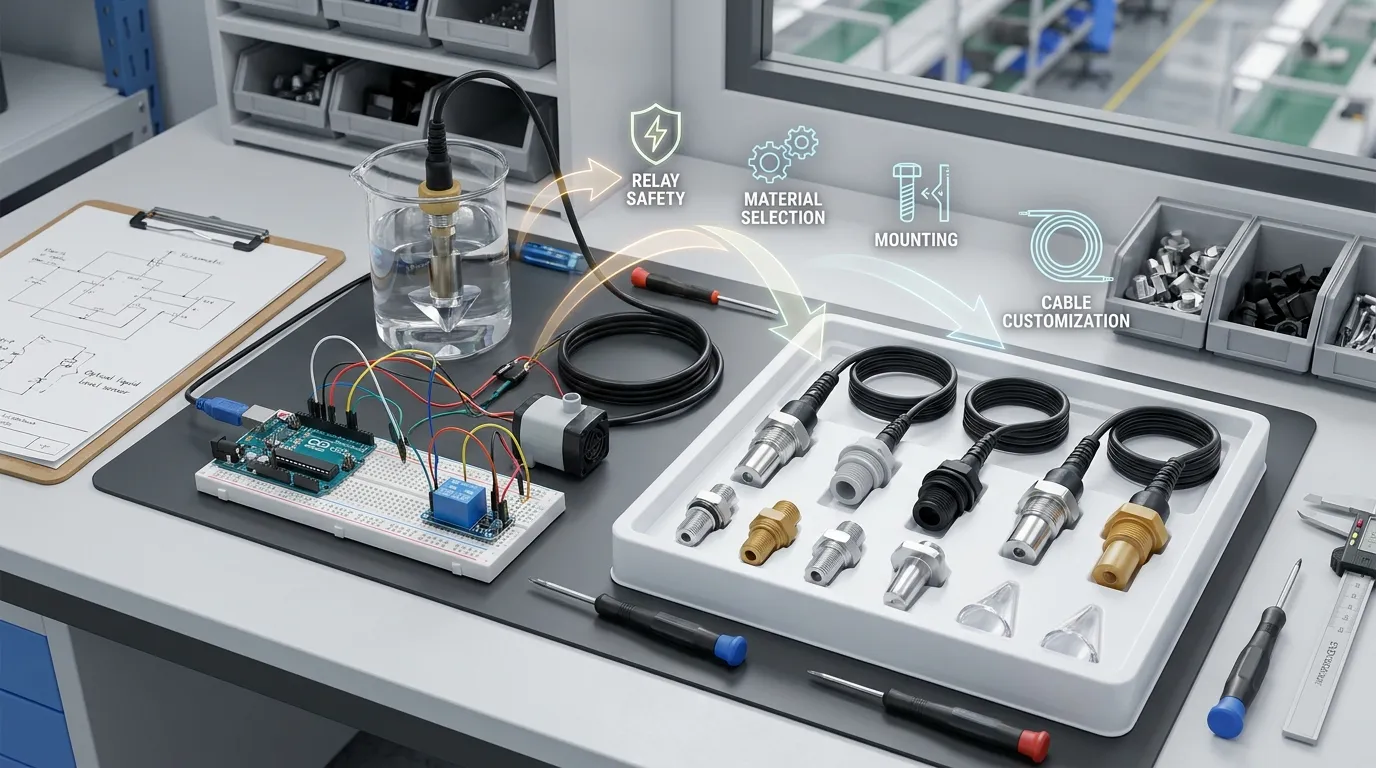
Tá socrú Arduino den scoth le haghaidh foghlama, tástáil cruthúnais coincheapa, Turgnaimh barr uisceadán, Aláraim taiscumar beag, agus bailíochtú luath táirge. Níl sé réidh go huathoibríoch le haghaidh trealamh tráchtála.
Ní mór dearadh braiteoir táirgthe a mheas séalaithe, faoiseamh brú cábla, Rogha cónascaire, comhoiriúnacht ábhar fliuch, Cineál Aschuir, snáithe gléasta, in-atrialltacht, táirgeadh QC, agus nochtadh fadtéarmach d'uisce, ola, glantach, cuisnithe, gaile, nó ceimiceáin. D'fhéadfadh go mbeadh NPN ag teastáil ó chórais thionsclaíocha agus OEM freisin, PNP, brú-tarraingt, analógach 4-20 mA, fad cábla saincheaptha, gléasta painéil, Comhlacht dhosmálta, Comhlacht PTFE, nó geoiméadracht phriosma dlúth a oireann d'umar múnlaithe.
Is monaróir agus onnmhaireoir Shenzhen é HojellyTek atá dírithe ar bhrath optúil fótaileictreach agus braite leibhéal leachtach. Do thionscadail léiriúcháin, ár R inmheánach&Is féidir le foireann D tacú le cumraíocht braiteoir OEM / ODM, Roghnú ábhar tithíochta, Saincheaptha Ceanglóir agus Cábla, agus comhtháthú le haghaidh fearais, umair, trealamh tionsclaíoch, agus táirgí monatóireachta leachtacha cliste. D'fhéadfadh comhtháthú Tuya / Smart Life a bheith ábhartha freisin le haghaidh feistí ceangailte ar leibhéal umar seachas fréamhshamhail simplí Arduino-amháin.
Onnmhairímid go dtí na Stáit Aontaithe, TÁIMID, agus an India, agus is féidir linn cabhrú le foirne bogadh ó thástáil Arduino DIY go réiteach braite leibhéal optúil indéanta.
Cad atá le deimhniú sula n-ordaíonn tú braiteoirí le haghaidh tógáil fíor
Sula mbogann tú níos faide ná an clár aráin, na sonraí seo a ullmhú:
| Ceanglas | Cén fáth a mbaineann sé le |
|---|---|
| Cineál leachtach | Uisce, ola, cuisnithe, glantach, agus d'fhéadfadh go mbeadh ábhair fhliuchaithe éagsúla ag teastáil ó mheascáin cheimiceacha |
| Staid an braiteora | Deimhnigh an bhfuil fliuch = ARD ag teastáil ón mbord rialaithe, fliuch = ÍSEAL, NPN, PNP, nó aschur analógach |
| Voltas soláthair | Is minic a úsáideann fréamhshamhlacha Arduino 5V, ach is féidir le boird táirgeachta ráillí loighic éagsúla a úsáid |
| Stíl gléasta | Snáithithe, Flange, Iontráil barr, taobh-iontráil, nó dearadh braiteoir gléasta umar saincheaptha |
| Ábhar an chomhlachta | PSU, PTFE, 316 cruach dhosmálta, agus gloine freastal ar thimpeallachtaí éagsúla |
| Cábla agus cónascaire | D'fhéadfadh nascóirí uiscedhíonach a bheith ag teastáil ó tháirgí OEM, fad cábla saincheaptha, nó luaidhe múnlaithe |
| Modh rialaithe caidéil | Sealaíocht, MOSFET, SSR, nó braitheann ionchur an rialaitheora ar voltas caidéil agus ualach |
| Comhshaol | Comhdhlúthú, tonnchrith, teocht, cúr, braoiníní, agus bíonn tionchar ag timthriallta glantacháin ar iontaofacht |
Tógálacha Ríomhaireachta Arduino agus Aon-Bhoird Gaolmhara
Má tá an tionscadal céanna á thógáil agat le rialtóir difriúil, féach ar ár Leagan Raspberry Pi. Tá an loighic sreangaithe cosúil, ach tá voltas GPIO agus cosaint ionchuir difriúil, mar sin ná cóipeáil sreangú Arduino 5V go díreach chuig Raspberry Pi.
Ceisteanna CCanna
Conas is féidir liom braiteoir leibhéal uisce optúil arduino a shreangú?
Ceangail VCC le Arduino 5V, GND go Arduino GND, agus digiteach OUT chuig GPIO mar D2. Ansin léigh an bioráin le digiteachLéigh() agus a dhearbhú cibé an aschuir do mhodúl ARD nó ÍSEAL nuair a bhíonn an barr priosma fliuch.
An léann an braiteoir leibhéal uisce optúil ARD nuair a bhíonn sé fliuch?
Braitheann sé ar an modúl. Roinnt aschur ARD nuair a fliuch; aschur daoine eile ÍSEAL nuair a bhíonn siad fliuch. Déan tástáil i gcónaí ar na stáit tirim agus fliuch i Monatóir Sraitheach sula nascann tú caidéal nó sealaíocht.
An féidir le Arduino caidéal a rialú ón gcomhartha braiteora?
Tá, ach ba chóir don Arduino modúl sealaíochta a rialú, Tiománaí MOSFET, nó tiománaí mótair. Ná cumhacht an caidéal go díreach ó bioráin Arduino.
Cén fáth a gcliceálann mo sealaíocht ar agus as go tapa?
Is gnách go dtagann comhrá sealaíochta ó léamha braiteoir éagobhsaí, tonnta, braoiníní, torann leictreach caidéil, nó loighic debounce in easnamh. Cuir moill stáit chobhsaí leis, Am íosta caidéil rith / amach, Sreangú níos glaine, agus soláthar cumhachta cuí.
An féidir liom an braiteoir céanna a úsáid le haghaidh ola nó ceimiceáin?
Ní i gcónaí. D'fhéadfadh an prionsabal braite a bheith ag obair, Ach tá comhoiriúnacht ábhar fliuch ríthábhachtach. Ola, cuisnithe, glantach, agus d'fhéadfadh PTFE a bheith ag teastáil ó cheimiceáin, 316 cruach dhosmálta, gloine, nó ábhar tithíochta oiriúnach eile.
Cathain ba chóir dom braiteoir OEM a chur in ionad an socrú Arduino DIY?
Bog go braiteoir OEM nuair a thiocfaidh an tionscadal chun bheith ina tháirge, fearas, umar tionsclaíoch, nó córas atá dírithe ar an gcustaiméir. Iarratas ar luachan ó HojellyTek trí WhatsApp nó ríomhphost le do chineál leachtach, voltas, Aschur, Gléasta, ábhar coirp, cábla, agus timpeallacht úsáide ionchais.


