
Pūoko Taumata Wai Ōmata DIY: Hanga & Kaiārahi Wāhanga
He Pūoko Taumata Wai Ōmata DIY Ka taea te hanga i roto i ngā huarahi ā-ringa e rua: whakahiato i tō ake upoko ōmata mai i tētahi LED IR, whakawhitiwhiti whakaahua, me te pito pororua, tīmata rānei ki tētahi kōwae taumata ōmata kua rite ka arotahi ki te waea, whakamau, me te tōkarikari. Ko te ara tuatahi e ako ana i a koe me pēhea te mahi o te kitenga wai whakaahua. He tere ake te ara tuarua, horoi, ā, i te nuinga o te wā he pono ake mō tētahi kaupapa kura mahi.
Ka whakamāramatia e tēnei aratohu ngā ara e rua, tae atu ki ngā wāhanga, take utu, Ngā kōwhiringa whakatū, hipanga tōkarikari, Ngā aratau rahunga pūnoa, ā, kia pai ake te hoko i tētahi pūoko kua oti mai i HojellyTek, kaua e haere tonu he hanga DIY.
He pēhea te kite a te pūoko taumata wai ōmata i ngā tūnga mākū me te maroke
Ka whakamahia e tētahi pūoko taumata ōmata te pūoko ā-whakaahua. Kei roto i te upoko pūoko, ka tukuna e te LED pōkākā te mārama ki tētahi poroporo mārama, ki tētahi aki ōmata rānei. He transistor whakaahua, dioira whakaahua, ka kitea rānei e te kaiwhiwhi te rama kua whakahokia mai.
Ina hau te pito poroporo, ka whakaata ā-roto te rama IR, ā, ka hoki kaha ki te kaiwhiwhi. Ina taupoki te wai i te pororua, Ka rerekē te whanonga mārama nā te mea he rerekē te taupū tāhapa o te wai i te hau. Ka kite te kaiwhiwhi i tētahi tohu hahaka, rerekē rānei, ā, ka tahuri te ara iahiko i taua huringa ki tētahi huaputa mākū/maroke.
Mō tētahi whakamāramatanga taumata-hua hōhonu ake, tirohia te HojellyTek's pūoko taumata ōmata aratohu.
Mō te whakamahi DIY, Ko te tikanga o tēnei kāore koe i te ine i te teitei o te kura katoa. Kei te hanga koe i tētahi pūoko taumata-ira: putua i tēnei wā, kī i tēnei wā, waipuke kua tae, Kua tae ki te taumata parenga papu, e hiahiatia ana rānei te whakakī anō o te puna.
Kōwhiria tō ara hanga DIY i te tuatahi
Ara A: Whakamahia tētahi Kōwae Pūoko Ōmata Reri
Koinei te kōwhiringa māmā rawa mō Arduino, ESP32, Raspberry Pi Pico, aunoatanga whakangahau, aquariums, kura wai, me ngā puna iti. Te upoko ōmata, kaituku, kaiwhiwhi, whare nohoanga, ā, kua hangaia kētia te ara iahiko taketake. Ka whakahaere anake koe i te putanga ngaohiko iti, panui tohu, whakamau, me te tōkarikari.
He pai ake te kōwae reri ina hiahia koe ki tētahi hua mahi tere, ā, kāore koe e hiahia ki te hoahoa i te āhuahanga ōmata i a koe anō.
Ara B: Hangaia te Upoko Ōmata mai i ngā Wāhanga
Koinei te ara mātauranga. Ka whakamahi koe i tētahi LED IR, whakawhitiwhakaahua, diode whakaahua rānei, Ngā Ātete, he tāurunga pūtaurite, pūmana moroiti rānei, me te poroporo, te pito ōmata mārama rānei. He whaitake mō te ako, hanga ritenga ake, ngā tauira taiwhanga rānei.
He uaua ake tēnei ara nā te tīaroaro ōmata, whakangungu rama taiao, parewai, māramatanga pororua, me te tōkarikari tukurua i ngā take katoa. Ka taea e te huringa iti o te koki, te mutunga mata rānei te huri i te pānui.
Ripanga Whakarite Wāhanga me te Utu
He rerekē ngā utu tūturu i ia kaiwhakarato, kounga, rauemi whare, me te rahinga, Nō reira whakamahia tēnei ripanga hei aratohu whakarite, kaua hei whakahua utu.
| Wāhanga, Rauemi rānei | Whāinga i roto i te Hanga | Pānga Utu DIY | He aha hei taki i mua i te hoko |
|---|---|---|---|
| ARAHI IR | Tukua ai te rama pōkākā ki te pito ōmata | Hakahaka | Rongangaru, koki tiro, rahi mōkī, huaputa pūmau |
| Phototransistor, photodiode ranei | Ka whiwhi i te rama IR e whakaata ana | Hakahaka | Tūtohutanga, tere urupare, tīaroaro mōkī |
| Poroporo, aki ōmata ūkui rānei | Waihanga ai i te huringa ōmata mākū/maroke | Waenga | Māramatanga ōmata, āhua, hototahitanga wai, kounga whakahinuhinu |
| Ngā Ātete | Tautuhia te taumata tohu LED o nāianei me te kaiwhiwhi | Hakahaka | Ngā uara tika mō tō ngaohiko papa |
| Wāhanga whakataurite rānei | Tahuri ai i te tohu tairitenga hei huaputa mamati pūmau | Iti ki te waenga | Whakaritenga paepae, ārai turituri |
| Arduino, ESP32, te poari MCU rānei | Ka pānui i te tohu me te whakahaere i te arorau | Waenga | Ngaohiko tāuru, Whanonga pine ADC/mamati |
| Kua rite te kōwae taumata ōmata | Whakahōu ai i te LED motuhake, kaiwhiwhi, me te hoahoa poroporo | Waenga | Ngaohiko tuku, momo huaputa, hiri taura |
| Whare, pātaka rānei | Ka pare i ngā hiko mai i ngā tī | Waenga | Parewai, putanga taura, kaha pūkaha |
| Repe taura, taura hiri rānei | Ka ārai i te haukū i te waea | Waenga | Kounga hiri, whakaora uaua, taiao kura |
| Te whakamau i te miro, taiapa rānei | Ka pupuri i te aki ki te taumata tika | Waenga | Rahi miro, mātotoru o te pakitara, takotoranga |
| Kua oti te pūoko mahi | Whirinoa rite-whakanao | Teitei ake i mua, whakahekea te mōrea mahi anō | Huaputa, papanga, whakamau, taura, Whakauru OEM |
Ko te utu huna i roto i te DIY ehara i te LED, i te kaiwhiwhi rānei. He parewai, whakamaunga tukurua, tīaroaro ōmata, me te wā e pau ana ki te whakatika i ngā pānui hē.
Ararere Whakaminenga 1: Whakamahi ana i tētahi Kōwae Ōmata Reri
Mō te nuinga o ngā kaihanga, Ko te kōwae Reri te wāhi tīmatanga pai rawa atu.
- Tautuhia ngā pine ngaohiko hahaka. Ko te nuinga o ngā kōwae ngāwari e whakarato hiko ana, whenua, me te tohu. Ka homai pea e ētahi kōwae he huaputa mamati, huaputa tairitenga, ngā mea e rua rānei. Kaua e whakaaro ki ngā tae waea; Tirohia te hoahoa kaiwhakarato.
- Tūhono anake ki tētahi papa mana ngaohiko hahaka hototahi. Whakamahia te Arduino, ESP32, he kairangitaki raraunga, he tāurunga PLC ngaohiko iti rānei ki te tika. Kaua e tūhono hāngai atu i te pūoko ki te hiko matua, ki te waea papu AC rānei.
- Whakamātauria i te hau i te tuatahi. Pānuitia te huaputa āhua maroke i mua i te whakauru i te pūoko ki roto i te wai.
- Kōrurutia te pito ōmata anake. Whakapūketetia te huaputa āhua-mākū. Mēnā he tairitenga te tohu, Kia mōhio koe ki te rerekētanga i waenga i ngā uara maroke me ngā uara mākū.
- Tautuhia tō paepae. Whakamahia he waewaenga mārama i waenga i ngā pānui maroke me ngā pānui mākū, kātahi ka tāpiri i tētahi takaware wā iti ki te waehere hei karo i te whakawhiti hē mai i ngā ngaru, i ngā tī rānei.
Mō ngā tauira pūmana moroiti ngaohiko iti, tirohia te Kaiārahi Arduino. Mō te tohutoro tūhononga tohu ahuwhānui, whakamahia te hoahoa waea.
Ararere Whakaminenga 2: Hanga ana mai i te LED IR, Whakawhitiwhakaahua, me Prism
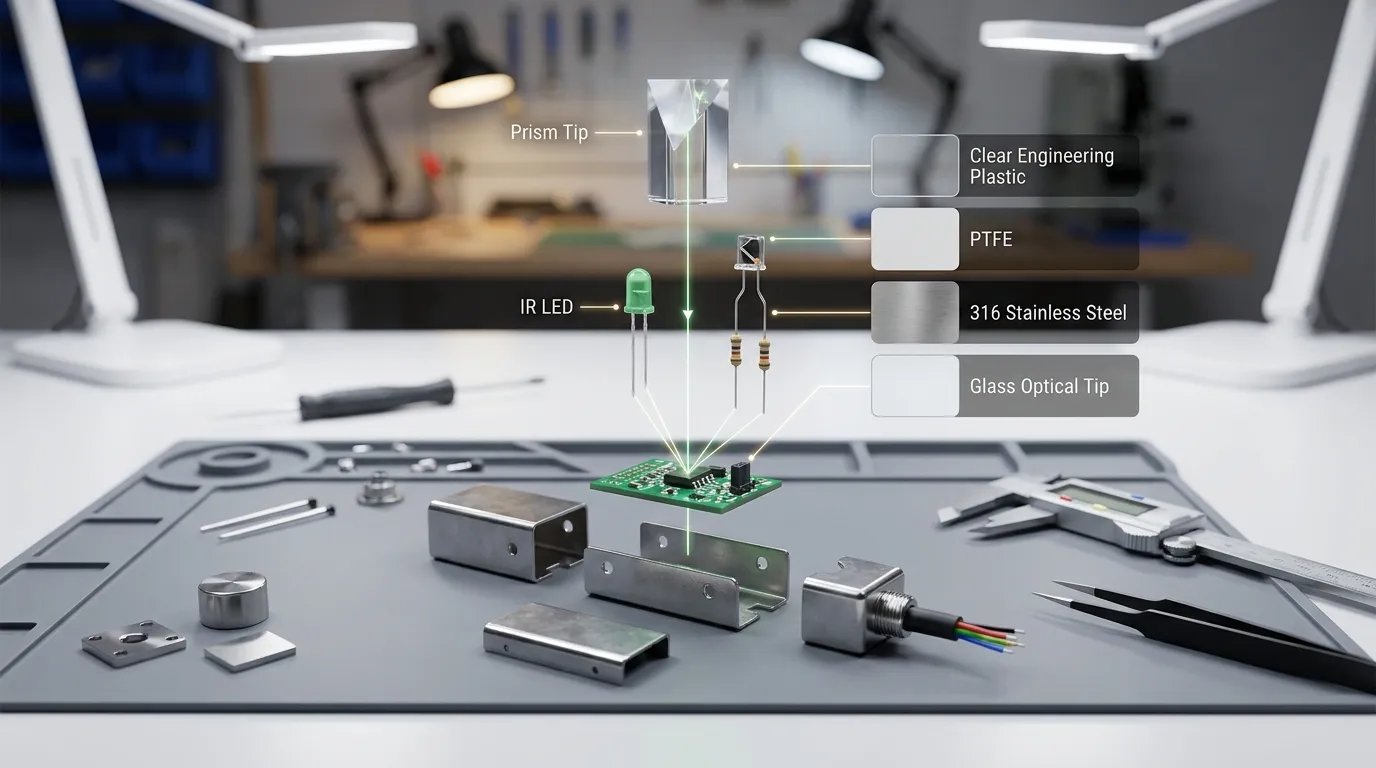
Mēnā e hiahia ana koe ki te hanga i te upoko pūoko i a koe anō, Ko te tahora ōmata te wāhanga tino nui.
Me tiaho te IR LED ki roto i te prism, ki te pito mārama rānei i tētahi koki tukurua. Me whakatū te kaiwhiwhi ki te wāhi e hoki kaha ana te rama whakaata i te āhua maroke. Ina pā te wai ki te pororua, ka taka, ka neke rānei te rama whakaata. Kātahi ka kitea e tō ara iahiko taua huringa.
Ka taea te whakarite i tētahi tauira taketake pēnei:
- I whāia te LED IR ki te tinana porohita mārama
- Kua whakanohoia te transistor whakaahua hei whiwhi i te IR e whakaata ana
- Ātete hei whakawhāiti i te onāianei LED
- Ātete kume-ake, kume-whakararo rānei mō te tohu kaiwhiwhi
- Tāuru tairitenga pūmana moroiti, tāurunga whakataurite rānei
- Whakangungu huri noa i te takirua ōmata hei ārai i te rama rūma
- Te upoko pūkaha hiri kia tae ai te wai ki te pito poroporo anake
Ko te wāhi uaua rawa ko te hanga i te porohita. He aki kirihou taratara, mata rakuraku, epoxy kapua, ka taea rānei e te LED tītaha hē te whakararuraru i te pūoko. Mō te wai, Ka pai pea te aki ōmata kirihou mārama mō te ako. Mō te hinu, Kora, matū, horoi horoi, wai wera rānei, Ka nui ake te taumaha o te kōwhiringa rawa.
Ngā Rauemi Mākū: kirihou, PTFE, tīra poapoa, me te Karaehe
Ko te "rauemi mākū" te wāhanga e pā ana ki te wai. Mō tētahi kaupapa DIY, I te nuinga o te wā e arotahi ana te tangata ki te ara iahiko anake, engari ko te rauemi e whakapā ana ki te wai e whakatau ana mēnā e ora ana te pūoko.
PSU, kirihou pūkaha rānei Ka whai take pea mō ngā hoahoa taumata wai kiato e mārire ana te mārakerake matū. He ngāwari kē atu te mīhini, te hanga rānei i te konganuku.
PTFE ka kōwhiria ina hiahiatia he kaha ake te ātete matū, te whanonga ārai rākau rānei. Ka whai take pea ki te āwangawanga te toenga, te wai whakatuki rānei.
316 tīra poapoa he mea noa mō ngā whare ahumahi nā te mea ka hoatu he kaha pūkaha, ātete waikura, me te tinana miro ngaio.
Ngā aki ōmata karaehe ka whakamahia nuitia ki te wāhi māramatanga ōmata, parenga pāmahana, he mea hira rānei te pūmautanga matū. Ka taea hoki e te karaehe te āwhina ki te tāruarua i te mata porohita.
Mō te ako DIY, Ka whakaaetia pea te kirihou ngāwari. Mō ngā taputapu OEM, taputapu, kaupapa hinu/hinu, Ngā hua kaweake rānei, Whakaūngia te hototahitanga rauemi i mua i te tono i tētahi pūoko.
Ngā Momo Huaputa Ka Kitea Pea: Mamati, NPN, PNP, me te 4–20 mA
Ko te tikanga ka whakarato ngā kōwae whakangahau iti i tētahi tohu mamati māmā, ngaohiko tairitenga rānei. Ka taea e ngā pūoko ahumahi te whakamahi i te NPN, PNP, atanga kāhua-tānga, huaputa 4–20 mA rānei i runga anō i te pūnaha mana.
Huaputa NPN he mea noa ki te wāhi e totohu ai te pūoko i te wā o nāianei ki te tāuru mana.
huaputa PNP he mea noa iho te wāhi e pūtake ai te pūoko o nāianei ki te tāurunga mana.
4–20 mA huaputa ka whakamahia nuitia mō te tarenga tairitenga ahumahi, i te nuinga o ngā wā e hira ana ngā oma taura roa, ārai turituri rānei. Mō tētahi pūoko DIY taumata-pito ngāwari, i te nuinga o te wā he nui te huaputa mamati.
I mua i te tono, Tirohia te momo tāuru o tō pūmana. He pūoko pai tonu pea te pūoko whai huaputa hē, engari e kore e tūhono mā ki tō papa me te kore hiko atanga.
Whakatū tika ana i te pūoko
Mā te whakatū e whakatau mēnā ka mā tō pūoko ōmata.
He mea noa iho te whakatūnga taha mō te haurapa taumata-ira. Ka puta te pito prisma i te pakitara o te kura, ā, ka noho tonu ki te taumata e hiahia ana koe ki te kite. He kaha ake te whakatūnga miro i te kāpia, i te rīpene rānei, ina wiriwiri te kura, ka kumea rānei te taura.
Mō ngā ipu DIY iti, Ka taea e te taiapa te pupuri i te pūoko mai i runga, engari me mau tonu te pito ki te teitei i whiriwhiria. Ki te neke te pūoko, Ka neke hoki tō taumata keu.
Takina ēnei pūwāhi whakatū:
- Kia mā te pito poroporo, kia mārakerake hoki ki te wai.
- Kaua e whakatata rawa te pito ki ngā pakitara whakaata, ki ngā wāhanga konganuku mōhinuhinu rānei.
- Kaua e tukua ngā taura kia iri ki tētahi ara e kume ana i te pūoko.
- Hiritia tikahia te puare o te kura.
- Puritia te taha hiko kia matara atu i te whakatōpū me te tī.
- Kōwhiria te miro me te kāhua whakatū i mua i te wiri i te kura.
Mō ngā taputapu whakanao, Ko ngā whakataunga noa ko te tinana tōtika me te koki matau, whakamaunga miro vs flange, kirihou vs whare poapoa, me te roanga taura.
tōkarikari: Hurihia ngā Pānui Mākū, Maroke hoki hei Tohu Pono
He ngāwari te tōkarikari engari kaua e tīpoka.
Tuatahi, Whakahikotia te pūoko i te hau me te hopu i te pānui maroke. Kātahi ka whakamākū katoa i te prism ka hopu i te pānui mākū. Ki te whakamahi i te tāuru tairitenga, Kōwhiria he paepae whakawhiti i waenga i aua uara e rua. Mēnā kei te whakamahi i te huaputa mamati, whakaūngia mēnā ka pānui te kōwae i te TEITEI ina mākū, i te TEITEI rānei ina maroke.
Kātahi ka whakamātau i ngā here tūturu:
- whakakī pōturi
- whakakī tere
- tārewa
- mirumiru
- huka
- pata pata e piri ana ki te pito
- wai paruparu, toenga rānei
- mārakerake mārama taiao
- wiriwiri tata ki te kura
Tāpirihia te tāwhana ki te waehere, arorau rānei. Mā te takaware poto i mua i te whakaū i te mākū, i te maroke rānei e ārai i ngā pūoho teka ina pā poto te wai ki te poroporo.
Ngā Hapa DIY Noa, me Pēhea te Karo
Whakararuraru rama ā-taiao: Ka pāngia pea ngā pūwhiwhi IR e te rā o te rā, rama pakari, taiao whakaata rānei. Whakangungu i te LED me te pūwhiwhi, me te whakamātau tata ki te taiao tāuta whakamutunga.
pororua paruparu: Kiriata hinu, tauine kohuke, almue, puehu, ka taea rānei e te wai whakapiri te huri i te ara ōmata. Horoia te pito ka kōwhiri i tētahi rauemi e ōrite ana ki te wai.
Kuhi huaputa hē: Ka kā ētahi pūoko ina mākū; ko ētahi e whakakā ana ina maroke. Whakamātauria ngā tūnga e rua i mua i te tūhono i ngā arorau mana i ngā wā katoa.
He koretake te parewai: Tērā pea ka hinga tētahi tauira tēpu mahi i roto i tētahi wāhi kura haukū. Hiritia ngā putanga taura, parea te papa ara iahiko, me karo i ngā hononga whakapiri e tata ana ki te wai.
Āhuahanga pororua kino: E hiahiatia ana e ngā prisma DIY ngā mata mā me ngā koki tukurua. Ka taea e te acrylic tapahi-taratara, te piripiri kapua rānei te whakaiti i te whakaata.
Kāore he whakamāmātanga uaua pūkaha: Ka taea e te nekehanga taura te wewete i te pūoko, te whāwhā rānei i te hiri.
Kāore he tāwhana: Ngā Ngaru, huka, ā, ka taea e ngā pata te waihanga i ngā tauwhiro hē poto. Whakaūngia te āhua mō tētahi wā poto i mua i te mahi.
Ina hoko i tētahi pūoko kua oti he māmā ake i te DIY
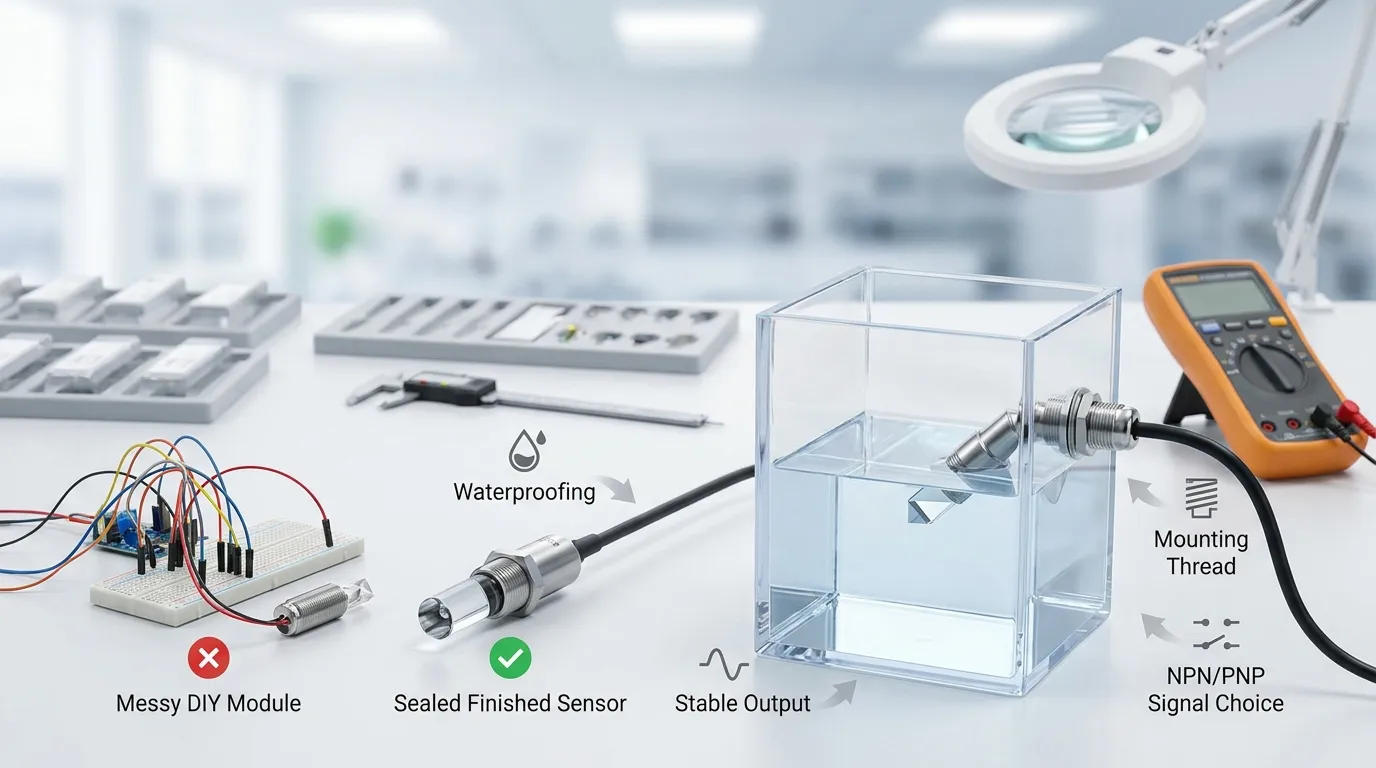
He māmā ake te DIY ina ako koe, whakamātauria tētahi ariā, te hanga rānei i tētahi tauira tauira tere mai i ngā wāhanga kei a koe kē. Engari he māmā ake te pūoko taumata ōmata kua oti ina tatau koe i te utu katoa o te kaupapa.
Hokona he pūoko kua oti ina hiahia koe:
- haurapa mākū/maroke ka taea te tukurua
- taura hiri me te whare
- NPN pūmau, PNP, huaputa ahumahi rānei
- tinana kiato mō te mokowā whāiti
- PTFE, 316 poapoa, Karaehe, ētahi atu kōwhiringa rauemi mākū rānei
- Whakaritenga OEM/ODM
- ōritetanga o te rahinga whakanao
- whakawhitiwhitinga kaiwhakarato rite-kaweake
- iti ake ngā rahunga āpure
Ko HojellyTek he kaiwhakanao Shenzhen me te kawekawe e arotahi ana ki te pūoko ōmata whakaahua, R ā-whare&D, me ngā kaupapa pūoko taumata wai OEM/ODM mō ngā kiritaki i te US, MATOU, Īnia, me ētahi atu mākete. Mēnā kei te neke tō tauira DIY ki tētahi hua tūturu, to tatou pūoko ōmata moroiti kua oti ka whakaheke pea i te mahi anō, mōrea hiri, me te wā huihuinga.
He aha hei whakaū i mua i te tono i tētahi pūoko taumata ōmata kua oti
I mua i te tuku RFQ, whakaritea ēnei taipitopito:
- momo wai: wai, hinu, Kora, horoi horoi, waiwhakao, matū rānei
- rauemi kura me te mātotoru o te pakitara
- tūnga whakatū me te kāhua miro e hiahiatia ana
- whakaritenga arorau mākū/maroke
- momo huaputa: NPN, PNP, tairitenga, tētahi atu atanga rānei
- Ngaohiko Whakarato e hiahiatia ana e tō papa mana
- roanga taura me te manakohanga tūhono
- manakohanga rauemi mākū: kirihou, PTFE, 316 poapoa, Karaehe
- mēnā e hiahiatia ana e te kaupapa te rahi tinana OEM, tapanga tūmataiti, taura ritenga ake rānei
- mēnā he tauiratauira te pūoko, oma kaihautū, te whakanao papatipu ranei
Mō te aroturuki kura atamai, ngā kaupapa pūrere tūhono rānei, Ka taea hoki e koe te kōrerorero i ngā hiahia whakaurunga pēnei i ngā papa pūmana, kōwae ahokore, hoahoa pūnaha rānei e pā ana ki a Tuya/Smart Life ki te hāngai.
FQ
Ka taea e au te hanga i tētahi pūoko taumata wai ōmata diy me tētahi IR LED me te phototransistor?
Āe. Ka taea e koe te hanga i tētahi pūoko taumata-ōmata taketake mā tētahi LED IR, whakawhitiwhiti whakaahua, pito pororua, Ngā Ātete, me tētahi papa mana ngaohiko iti. Ko ngā wāhanga uaua ko te tīaroaro ōmata, parewai, whakangungu rama taiao, me te tōkarikari pūmau.
He pai ake te kōwae taumata ōmata rite i te hanga mai i ngā wāhanga motuhake?
Mō te nuinga o ngā kaupapa ā-ringa, Āe. Ka penapena wā te kōwae reri nā te mea kua huihui kētia te upoko ōmata me te ara iahiko taketake. He pai ake te hanga mai i ngā wāhanga motuhake mō te ako, Ngā whakamātautau ritenga ake, te mārama rānei me pēhea te mahi a te mātāpono pūoko.
Ka taea e tēnei pūoko te ine i te taumata kura katoa?
Ka kitea e tētahi pūoko taumata ōmata taketake te wai i te wā kotahi. Ka kī atu mēnā he mākū, he maroke rānei te pito poroporo. Mō te inenga taumata kura motukore, E hiahia ana koe ki tētahi huarahi pūoko rerekē, ki ngā pūwāhi pūrongo maha rānei.
He aha i hē ai te whakaoho o taku pūoko ōmata?
Ko ngā take noa ko te rā o te rā, mata pororua paruparu, pata pata e mau ana ki te pito, pakitara kura whakaata, waea tārewa, hiri koretake, ā, kāore he tāwhana i roto i te arorau mana. Whakamātauria ngā pānui maroke me te mākū i raro i ngā āhuatanga tūturu.
Ka taea e au te whakamahi i tēnei pūoko hei whakahaere i tētahi papu?
Ka taea e koe te whakamahi i te tohu pūoko ngaohiko iti hei tāuru ki tētahi pūmana tika. Kaua e waea hāngai atu te pūoko ki te hiko matua, ki tētahi papu AC rānei. Me hoahoa ngā ara iahiko papu ki te taratahitanga tika me te parenga haumaru e tētahi tangata mātauranga.
Āhea me whakapā atu ahau ki a HojellyTek, kaua e haere tonu ki te DIY?
Whakapā atu ki a HojellyTek ina hiahia tō tauiraira ki tētahi tinana hiri, huaputa pūmau, rahinga kiato, rauemi mākū motuhake, Whakaritenga OEM/ODM, ōritetanga rite-whakanao rānei. Tukua tō momo wai, aratuka whakamau, whakaritenga huaputa, me te mahere nui mā WhatsApp, īmēra rānei hei tono whakahua.


