
Pūoko Taumata Wai Ōmata Arduino: Waea & Kaiārahi Waehere
He ngāwari te tūhono pūoko taumata wai ōmata arduino mō tētahi kaupapa kura DIY: tūhono pūoko VCC ki Arduino 5V, pūoko GND ki Arduino GND, me te waea OUT mamati pūoko ki tētahi pine GPIO pēnei i te D2. Ka pānuitia e tō tātuhi ko te GPIO he TEITEI, he ITI rānei, kātahi ka whakamahi i te hua hei whakawhiti i tētahi LED tūtohu, puoro, kōwae tānga, ara iahiko mana papu rānei.
E arotahi ana tēnei aratohu ki te waea ā-ringa, hanganga tātuhi, whakamarumaru tānga, raweke tāwhana, me te wāhi e noho ai tētahi tauira papa parāoa hei hoahoa pūoko rite ki te whakanao. Mō ngā taketake pūoko ōmata, whakamahia ā mātou katoa pūoko taumata ōmata whakamārama, kaua e tārua i ngā ariā katoa i konei.
Tūhono Arduino Taketake: 55, GND, ATU ki GPIO
Ko te nuinga o ngā kōwae pūoko taumata wai pōkākā ōmata 5V e whakamahia ana me Arduino e toru ngā tūhononga taha-tohu:
- VCC / + → Arduino 55
- GND / - → Arduino GND
- PUTA / O / tohu → pine tāuru mamati Arduino, Hei tauira D2
I muri i te waea, whakatuwheratia te Kaupane Rangatū Arduino ka tā i te āhua pine. Whakamātauria te aki pūoko i te hau, kātahi ka pā ki te wai. Ka pānui tētahi āhua i te TEITEI, ā, ko tētahi ka pānui i te ITI. Kaua e whakaaro he ōrite te whanonga o ia kōwae. Ko ētahi papa e whakaputa ana i te TEITEI ina maroke me te ITI ina mākū; ko ētahi e kōarotia ana i runga anō i te ara iahiko, huaputa whakawhitiwhiti, hoahoa kume-ake rānei.
Mō tētahi tohutoro arokite, tirohia tā mātou whakatapua hoahoa waea aratohu.
Ngā Mōtete me te Ripanga Pinout
| Tūemi / Pine | Tūhono ai ki | Whāinga | Ngā Tuhipoka |
|---|---|---|---|
| Arduino Uno, Nano, papa hototahi rānei | USB / 5Putanga V | Ka pānui i te pūoko me te whakahaere i te arorau huaputa | Tīmata ki te whakamātau mai i te USB i mua i te tāpiri mapu |
| 5Kōwae pūoko taumata wai IR ōmata V | 55, GND, GPIO | Ka kite i te āhua mākū/maroke i te pūwāhi taumata wai kotahi | He 5Kōwae pūoko V IR he tino ngawari mo nga tauira Arduino |
| Pūoko VCC | Arduino 5V | Ka whakahiko i te kōwae pūoko | Whakaūngia te kōwae e tautoko ana i te 5V i mua i te tūhono |
| Pūoko GND | Arduino GND | Tohutoro noa | E hiahiatia ana mō ngā pānui pūmau |
| Pūoko PUTA / O | Arduino D2, tētahi atu GPIO rānei | Tukua ai te tohu HIGH/LOW | Whakamahi TĀURU rānei INPUT_PULLUP e ai ki te huaputa kōwae |
| Kōwae tānga MAI | Pine huaputa Arduino, pērā i te D8 | Whakahaere ai i te whakawhiti papu | Whakamahia he kōwae tānga, ehara i te coil relay hāngai mai i Arduino |
| Kōwae tānga VCC/GND | 5V putanga tānga / whenua | Ka whakamana i ngā hiko tānga hiko | E hiahiatia ana e ētahi papa tānga he nui ake o nāianei i te mea ka taea e Arduino te whakarato haumaru |
| mapu | Tānga taha hoapā + putunga papu | Ka nuku wai | Me ōrite te putanga papu ki te ngaohiko papu me te onāianei |
| LED Kōwhiri / puoro | Pine huaputa Arduino | Tāuta whakamātautau tuatahi haumaru | Whakamātauria te arorau i mua i te tūhono papu |
He pēhea te whanonga o te pūoko ōmata i roto i tētahi kaupapa wai tūturu
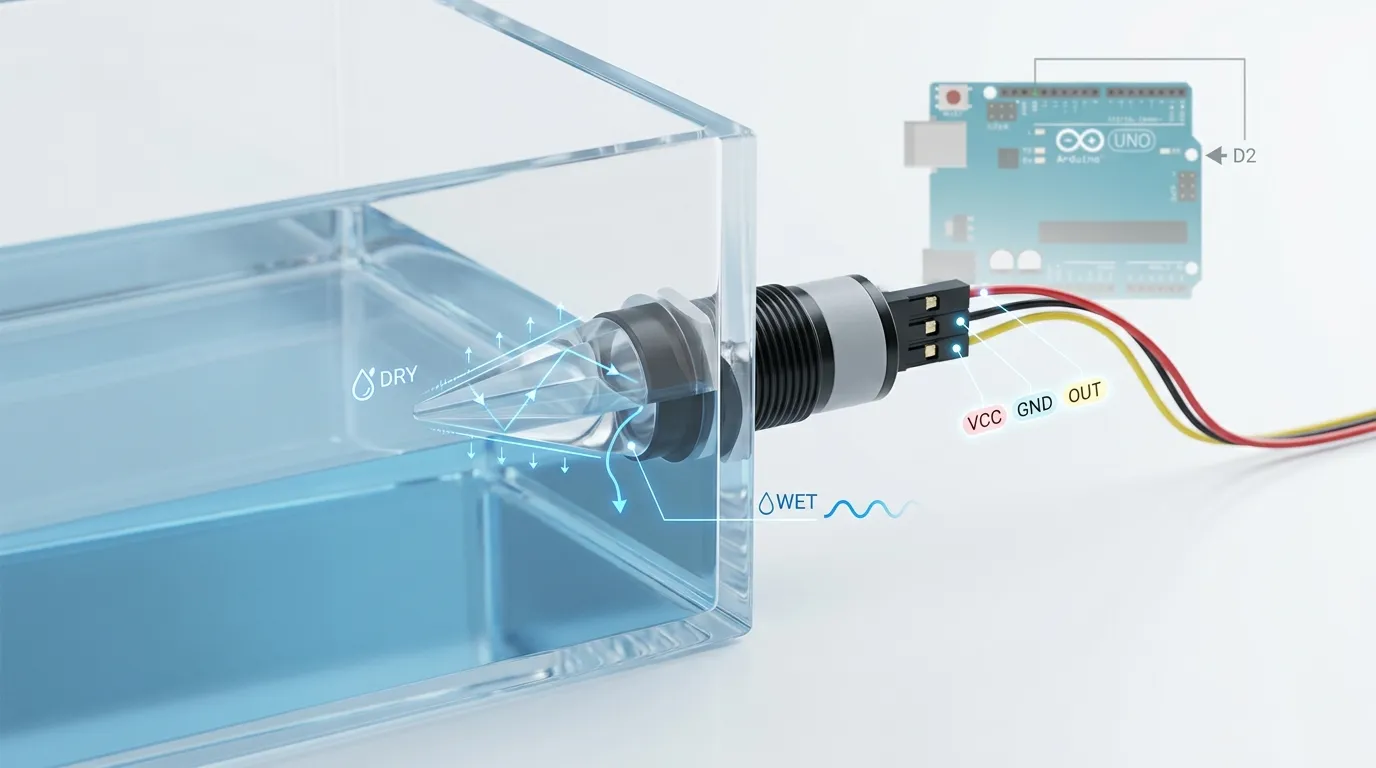
Ko te tikanga ka whakamahi te pūoko taumata wai ōmata i tētahi LED IR, whakawhitiwhakaahua, diode whakaahua rānei, me te pito prism kua hangaia. Ina maroke te pororua, E whakaata ana te rama pōkākā ki roto ki te pūwhiwhi. Ina mākū te pito i te wai, i tētahi atu wai rānei, ka huri te whakaata nā te mea ka huri te rohenga tāhapa. Ka tahuri ngā hiko pūoko i taua huringa ōmata hei huaputa hiko.
Mō ngā mahi DIY Arduino, I te nuinga o te wā e māharahara ana koe ki te tohu whakamutunga: mākū, maroke rānei, TIKETIKE, ITI rānei. Hoianō, Kei te whai take tonu te pūoko ōkiko. He puna aquarium iti, he kura mīhini kawhe, pounamu whakamātao, ā, ka hiahiatia pea e tētahi ipu hinu he rauemi mākū rerekē. Ko ngā kōwhiringa whakanao noa ko te kirihou PSU mō ngā taupānga wai kiato, PTFE mō te parenga matū, 316 tīra poapoa mō ngā kura mahi taratara, me te karaehe mō ētahi hoahoa mā, mārama tiketike rānei.
Ka huri hoki te whakatū i te mahinga. Ka kitea e tētahi pūoko miro whakamau-taha tētahi taumata pūmau mā te pakitara kura. Ka taea te whakamahi i te rūpahu poutū mai i runga, i te taupoki rānei. Ngā kōwhiringa miro, whakamau harakeke, aronga putaatu taura, kahu hiri, me te tūnga prism ka pā katoa mēnā ka kite te pūoko i te taumata wai pono, i ngā pata mau anake rānei, huka, tārewa rānei.
Mō Arduino, Kia ngāwari te whakamātautau tuatahi: Puritia te aki pūoko ki te hau, kātahi ka toua te pito poroporo anake ki roto i te wai. Kaua e kōruru i ngā papa ara iahiko mārakerake ki te kore e hiritia katoatia, kua hoahoatia hoki te kōwae mō te rumaki.
Tātuhi Hanganga me te Kore Putunga Waehere Nui
Me whakarite he tātuhi Arduino pono mō tēnei kaupapa i roto i te iti, ūkui wahanga:
- Tautuhia ngā pine
Tautuhia tētahi pine mō te tāurunga pūoko, pērā i te D2, me te pine kotahi mō te huaputa tānga tānga, pērā i te D8. - Tautuhia ngā aratau pine ki te tatūnga
Ka noho te pine pūoko hei tāuru. Ka noho te pine tānga hei huaputa. Tautuhia te tānga ki te āhua taunoa haumaru i mua i te tīmatanga o te koromeke. - Pānuitia te āhua pūoko
Whakamahi mamatihikoPānui() hei pānui i te TEITEI, i te ITI rānei mai i te pine huaputa pūoko. - Whakamaheretia te arorau mākū/maroke
Whakamātauria tō kōwae tūturu, ā, ka whakatau mēnā ko te tikanga o te HIGH ko te mākū, te maroke rānei. Penapena mārama i taua arorau kia kore ai koe e whakahoki hē i te whanonga papu. - Whakahaere i te tānga
Mēnā kei te ngoikore te kura, whakakāngia te tānga papu. Ki te tae te wai ki te pūwāhi pūoko, whakawetohia te tānga. Mō te waipuke, ka whakahokia pea te arorau. - Tāngia ngā karere tātaritanga
I te wā o te whakamātautau, tāngia "mākū," "maroke," "papu i runga," me te "papu atu" ki te Kaupane Rangatū. Tangohia, whakaitia rānei ngā karere ā muri ake nei ki te hiahiatia.
He pai te tātuhi poto, Engari kaua e tārua i tētahi paraka waehere matapōkere i mua i te whakaū i te huaputa mākū/maroke o te pūoko. Ko te hē tino pūnoa ko te waea tika i ngā mea katoa engari mā te whakamahi i te arorau kōaro i roto i te āhuatanga tānga.
Ārai Keu Hē me te Ārai Keu Hē
He tere ake ngā pūoko ōmata i te maha o ngā whakakā mānu, he whaitake, engari ka taea tonu e te pūnaha papu te waihanga pānui tūkino. Ngaru wai, mirumiru, pata pata i runga i te pororua, turituri hiko o te papu, mā te waea peke tārewa rānei e kite ai te Arduino i ngā huringa HIGH/LOW tere.
Whakamahia te tātari pūmanawa ngāwari:
- Pānuitia te pūoko kia maha ngā wā i mua i te huri i te āhua tānga.
- Me ōrite te āhua mākū/maroke mō te 200–1000 ms i mua i te mahi.
- Tāpirihia he wā whakahaere papu mōkito, he wā whakaweto papu mōkito rānei hei aukati i te kōrerorero tānga.
- Whakamahia te Kaupane Rangatū hei whakaū mēnā i puta mai te kōpuru i te nekehanga wai, i te turituri hiko rānei.
- Puritia te taura papu i te taura tohu pūoko ki te taea.
- Whakamahia he pūtake hiko pūmau, kaua e whakahiko i ngā mea katoa mai i tētahi tauranga USB ngoikore.
Mō ngā kura whai ngaru, tārewa rānei, kaua e whakamau i te poroporo ki te wāhi e pā auau ai te wai, ka puta atu i te pito. Purua te pūoko ki tētahi wāhi mārire ake, whakamahia he ngongo whakangāwari iti mēnā e tika ana, tāpirihia rānei he takaware wā kia urupare ai te Arduino ki tētahi taumata pūmau anake.
Te whakahiko haumaru i tētahi tānga me te papu
Kāore e taea e te pine Arduino te whakahiko hāngai i tētahi papu. Kaua hoki e taraiwa hāngai i tētahi tāpae tānga kore. Me tuku anake e te pine huaputa Arduino he tohu mana ki tētahi kōwae tānga, Atekōkiri MOSFET, ara iahiko atekōkiri mīhini rānei.
Pēnei te āhua o tētahi whakaritenga tānga haumaru noa iho: Ka pānui a Arduino i te pūoko ōmata i D2, kātahi ka whakahaere i te tāurunga kōwae tānga i D8. Ka whakakāngia e te kōwae tānga te aho hiko motuhake o te papu i te taha whakapā. Me ōrite te puna hiko papu ki te ngaohiko papu me te onāianei, i te wā e noho tonu ana te Arduino i runga i tōna ake puna arorau.
Tirohia ēnei pūwāhi i mua i te whakawhiti i te papu:
- Me tika te whakatauranga hoapā tānga mō te kawenga papu.
- Me hototahi te kōwae tānga ki te arorau Arduino.
- Me kaua te putunga papu e whāngai anō ki roto i te Arduino.
- Mēnā e hiahiatia ana e te papa tānga he whenua ngātahi i te taha mana, tūhono tika.
- Whakamahia te parenga flyback mō ngā coils me ngā mīhini ina kāore anō kia whai parenga te kōwae.
- Purua te mahi ngaohiko matua ki roto i tētahi pātaka tika, ā, ka whiwhi āwhina mātauranga mēnā kei roto te hiko AC.
- Whakamātauria i te tuatahi mā te LED, ine maha rānei i mua i te tūhono i te papu.
Mō ngā papu DC iti, he mārire ake, he roa ake pea te kōwae MOSFET taumata-arorau i te tānga pūkaha. Mō ngā papu AC, Whakamahia he tānga whakatauranga tika, SSR, te hoapā rānei i hoahoatia mō te momo utanga.
Tauira DIY vs Pūoko Taumata Ōmata Hua
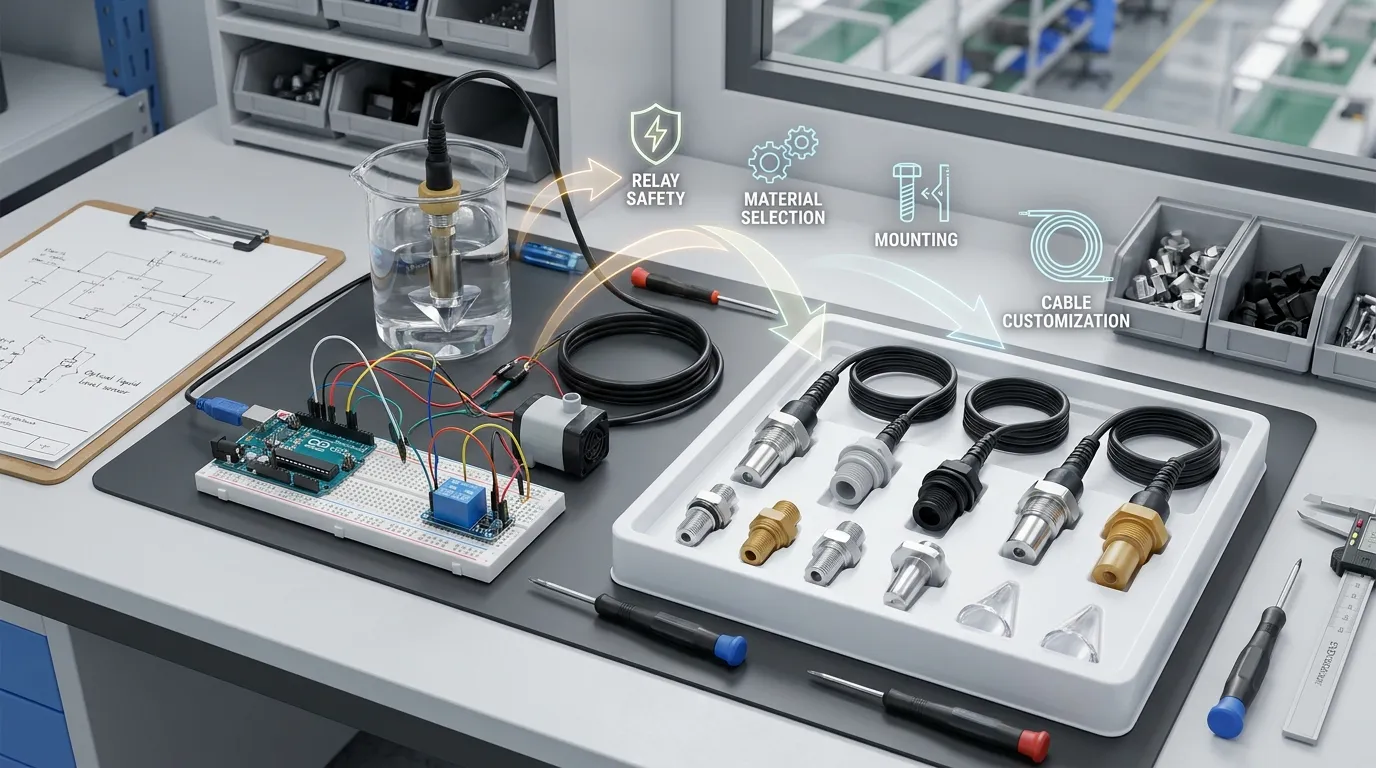
He tino pai te tatūnga Arduino mō te ako, whakamātautau whakatika-o-ariā, whakamātautau whakarunga aquarium, pūoho puna iti, me te whakamanatanga hua o mua. Kāore i te rite aunoa mō ngā taputapu arumoni.
Me whakaaro te hoahoa pūoko hua ki te hiri, whakaora uaua taura, kōwhiringa tūhono, hototahitanga rauemi mākū, momo huaputa, miro whakamau, tukuruatanga, whakanao QC, me te mārakerake mo te wā roa ki te wai, hinu, horoi horoi, waiwhakao, kohu, matū rānei. Tērā pea ka hiahiatia e ngā pūnaha ahumahi me ngā pūnaha OEM te NPN, PNP, pana kume, tairitenga 4–20 mA, roanga taura ritenga ake, whakatūnga paewhiri, tinana poapoa, Tinana PTFE, he āhuahanga poroporo kiato rānei e uru ana ki tētahi kura kua hangaia.
Ko HojellyTek he kaiwhakanao Shenzhen me te kawekawe e arotahi ana ki te kitenga ōmata whakaahua me te haurapa taumata wai. Mō ngā kaupapa whakanao, tā mātou R ā-whare&Ka taea e te tīma D te tautoko i te whirihoranga pūoko OEM/ODM, tīpakonga rauemi whare, Tūhono me te whakaritenga taura, me te whakaurunga mō ngā taputapu, kura, taputapu ahumahi, me ngā hua aroturuki wai atamai. Tērā pea ka hāngai te whakaurunga Tuya/Smart Life mō ngā pūrere taumata-kura tūhono, kaua ko tētahi tauiratauira Arduino-anake.
Ka kaweake mātou ki te US, MATOU, me Īnia, ā, ka taea e mātou te āwhina i ngā tīma ki te neke mai i tētahi whakamātautau Arduino DIY ki tētahi rongoā pūoko taumata ōmata ka taea te whakanao.
He aha hei whakaū i mua i te tono pūoko mō tētahi hanga tūturu
I mua i te neke ki tua atu i te papa parāoa, whakaritea ēnei taipitopito:
| whakaritenga | He aha te take |
|---|---|
| Momo wai | Wai, hinu, waiwhakao, horoi horoi, ā, ka hiahiatia pea e ngā ranunga matū ngā rauemi mākū rerekē |
| Tūnga pūoko | Whakaūngia mēnā me mākū te papa mana = TEITEI, mākū = PĀPAKU, NPN, PNP, huaputa tairitenga rānei |
| Ngaohiko tuku | I te nuinga o te wā ka whakamahia e ngā tauira Arduino te 5V, engari ka taea e ngā poari whakanao te whakamahi i ngā kaupae arorau rerekē |
| Kāhua whakamau | Miro, harakeke, urunga-runga, urunga taha, ka huri rānei te whakatūnga kura ritenga i te hoahoa pūoko |
| Rauemi tinana | PSU, PTFE, 316 tīra poapoa, me te karaehe e mahi ana i ngā taiao rerekē |
| Taura me te tūhono | Ka hiahiatia pea e ngā hua OEM ngā tūhono waikore, roanga taura ritenga ake, ārahi hanga rānei |
| Aratuka mana papu | Tānga, MOSFET, SSR, kei te whakawhirinaki rānei te tāurunga pūmana ki te ngaohiko papu me te utanga |
| Taiao | whakatōpū, wiriwiri, pāmahana, huka, pata pata, ā, ka pā ngā huringa horoi ki te whaikikotanga |
Ngā Hanganga Rorohiko Arduino me te Papa-Kotahi e pā ana
Mēnā kei te hanga koe i te kaupapa ōrite me tētahi pūmana rerekē, tirohia tā mātou Putanga Raspberry Pi. He ōrite te arorau waea, engari he rerekē te ngaohiko GPIO me te parenga tāuru, nō reira kaua e tārua hāngai tonu i te waea Arduino 5V ki tētahi Raspberry Pi.
FQ
Me pēhea taku waea i tētahi pūoko taumata wai ōmata arduino?
Tūhono VCC ki Arduino 5V, GND ki Arduino GND, me te OUT mamati ki tētahi GPIO pēnei i te D2. Kātahi ka pānui i te pine me te mamatihikoPānui() me te whakaū mēnā ka puta tō kōwae i te TEITEI, i te ITI rānei ina mākū te pito prisma.
Ka pānui te pūoko taumata wai ōmata i te TEITEI ina mākū?
Kei te āhua tonu o te kōwae. Ētahi huaputa TEITEI ina mākū; ko ētahi ka puta ITI ina mākū. Whakamātauria ngā tūnga maroke me te mākū i te Kaupane Rangatū i mua i te tūhono i tētahi mapu, tānga rānei.
Ka taea e Arduino te whakahaere i tētahi papu mai i te tohu pūoko?
Āe, engari me whakahaere e te Arduino tētahi kōwae tānga, Atekōkiri MOSFET, atekōkiri mīhini rānei. Kaua e whakahiko hāngai i te papu mai i tētahi pine Arduino.
He aha i tere ai te pāwhiri me te whakaweto i taku tānga?
Ko te nuinga o te wā ka puta mai te kōrerorero tānga i ngā pānuitanga pūoko tūkino, ngaru, pata pata, turituri mapu hiko, ngaro rānei te arorau tāwhana. Tāpirihia he takaware tūnga-pūmau, wā whakahaere/weto papu mōkito, waea māmā ake, me te puna hiko tika.
Ka taea e au te whakamahi i te pūoko ōrite mō te hinu, ngā matū rānei?
Kāore i ngā wā katoa. Ka mahi pea te mātāpono pūoko, engari he tino nui te hototahitanga o ngā rauemi mākū. hinu, waiwhakao, horoi horoi, ā, ka hiahiatia pea e ngā matū te PTFE, 316 tīra poapoa, Karaehe, tētahi atu rauemi whare pai rānei.
Āhea me whakakapi e au te tatūnga Arduino DIY ki tētahi pūoko OEM?
Nuku ki tētahi pūoko OEM ina noho te kaupapa hei hua, taputapu, kura ahumahi, pūnaha angahanga-kiritaki rānei. Tonoa he whakahua mai i HojellyTek mā WhatsApp, īmēra rānei me tō momo wai, ngaohiko, huaputa, whakamau, papanga tinana, taura, me te taiao whakamahi tūmanakohia.


