
Comment installer un capteur de niveau optique Neptune Systems
Si vous cherchez comment installer un capteur de niveau optique Neptune Systems, Le travail pratique est simple: montez l’OS-1 ou l’OS-1-M à la bonne hauteur d’eau dans la chambre de retour du puisard récifal, Fixez-le pour que la pointe sensorielle ne puisse pas bouger, connectez-le à l’entrée Apex/FMM, puis configurez la prise ATO avec des délais et des règles de sécurité avant de lui confier une pompe.
Ce guide se concentre sur les détails d’installation qui affectent réellement la fiabilité: Hauteur du capteur, Placement du support magnétique, Comportement OUVERT/FERMÉ, Fausses déclencheurs, Sel creep, nettoyage, et une planification redondante des capteurs.
Pièces nécessaires pour un OS-1 / Installation de puisards récifales OS-1-M
| Partie | But | Note d’installation |
|---|---|---|
| Capteur optique Neptune Systems OS-1 | Détecte l’état du niveau d’eau humide/sèche | Généralement utilisé avec un support ou un support traversant le mur |
| Capteur optique Neptune Systems OS-1-M avec monture magnétique | Installation plus facile sur la paroi de puisard | Utile si vous ne voulez pas percer ou fabriquer un support |
| Apex / Module FMM | Lit l’entrée du capteur optique | Le capteur doit être correctement assigné dans Apex Fusion |
| Pompe ATO ou pompe doseuse | Ajoute de l’eau douce lorsque le niveau du puisard baisse | Doit être contrôlé avec une protection contre le délai et la course maximale |
| Réservoir ATO | Approvisionnement en eau douce | Ajoutez un capteur de protection de bas niveau si possible |
| Clips à câbles ou accessoires de passage | Ça évite les éclaboussures et les outils d’entretien | Évitez la tension du câble près du corps du capteur |
| Chiffon de nettoyage / Brosse douce | Enlève le fluage du sel et le film | Ne rayez pas le prisme de détection |
| Capteur de haut niveau redondant | Sauvegarde contre le surchargement | Monter légèrement au-dessus de la ligne d’eau normale |
Pas 1: Choisissez la hauteur de montage dans la chambre de retour
Installez le capteur optique dans le Chambre de la pompe de retour, Pas dans une chambre où les déflecteurs maintiennent le niveau d’eau constant. C’est dans la chambre de retour que l’évaporation apparaît en premier, il donne donc au système ATO un signal significatif en basse mer.
Placez la pointe de détection OS-1 ou OS-1-M à la Conduite d’eau normalement en fonctionnement vous voulez que l’ATO maintienne. Quand l’eau descend en dessous de ce point, Le capteur indique un état sec/faible, et l’Apex peut activer la pompe ATO. Lorsque l’eau douce remonte le niveau au-dessus de la pointe du capteur, Le capteur indique mouillé/normal, et la pompe devrait s’arrêter.
Ne montez pas le capteur trop près de l’entrée de la pompe de retour, Écoulement turbulent des drains, Bulles écumeurs, ou une cascade entre les chambres de puisard. Les bulles et ondulations peuvent interrompre le signal optique et provoquer des vibrations. Un mur latéral stable de la chambre de retour est généralement le meilleur emplacement.
Pas 2: Installez le support magnétique ou le support
Pour un OS-1-M, Nettoyez les deux côtés de la paroi du puisard avant de placer le support magnétique. Faites glisser le capteur de façon à ce que la pointe optique pointe dans l’eau et soit au niveau de la hauteur de l’eau cible. Serrez ou verrouillez suffisamment le porte-roue pour que l’entretien régulier ne le déplace pas.
Pour un OS-1 sans support magnétique, Utilisez un support sécurisé, Porte-acrylique, ou un support de type traversant le mur. Le but n’est pas seulement de « tenir le capteur »; Cela empêche de minuscules variations de hauteur. Quelques millimètres de mouvement peuvent changer lorsque la pompe ATO démarre ou s’arrête.
Gardez le visage sensoriel exposé. Ne poussez pas la pointe du prisme contre l’acrylique, Coutures en silicone, Film d’algues, Tubulure, Escargots, ou macroalgues. Les capteurs optiques au niveau ponctuel ont besoin d’un chemin optique propre autour du prisme.
Pas 3: Comprenez comment la pointe optique indique humide ou sec
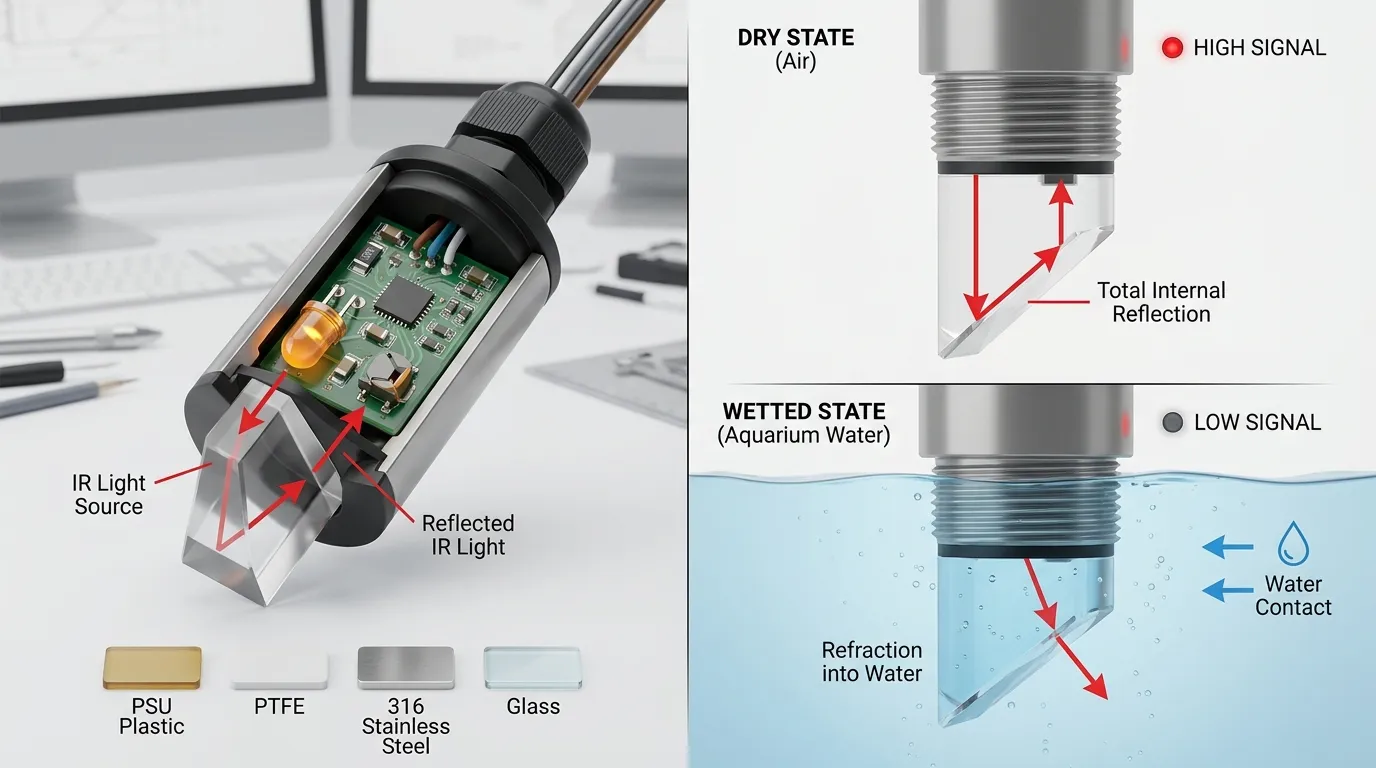
Un capteur optique ATO récifal fonctionne différemment d’un interrupteur à flotteur. À l’intérieur du corps du capteur, une LED infrarouge envoie la lumière vers une petite pointe prismatice. Un phototransistor reçoit la lumière réfléchie. Quand le prisme est sec, plus de lumière réfléchit à l’intérieur. Lorsque le prisme est mouillé, Le comportement optique change, et l’électronique indique un état différent.
C’est pourquoi les capteurs optiques n’ont pas de bras flotteur mobile, Mais ils ont quand même besoin d’une surface de détection propre. Dérive du sel, Film bactérien, Dépôts de calcium, et les bulles d’air peuvent toutes influencer la transition entre les états sec et humide.
Pour une sélection plus large des capteurs, HojellyTek’s Capteur de niveau optique La portée couvre les conceptions ponctuelles photoélectriques pour l’eau, huile, Liquide de refroidissement, et détection au niveau de l’équipement. Dans les systèmes d’aquarium, Le détail important n’est pas seulement le principe de détection mais aussi le matériau corporel, Conception du joint, Sortie du câble, et compatibilité des contrôleurs.
Pas 4: Branche le capteur à l’apex / FMM
Branchez OS-1 ou OS-1-M à la bonne entrée Apex/FMM. Ensuite, ouvre Apex Fusion et confirme que le port est reconnu comme le bon type de capteur. Avant de connecter la logique de pompe ATO, Testez manuellement le capteur:
- Maintenez la pointe du capteur dans l’air et notez l’état.
- Immergez la pointe du capteur dans l’eau du puisard et notez l’état.
- Faites-le passer lentement à travers la ligne d’eau cible.
- Confirmez que l’État change régulièrement.
- Étiquetez clairement l’entrée, comme ATO_LOW ou SUMP_LOW.
Ne supposez pas OUVERT et FERMÉ avant d’avoir testé le capteur réel dans votre installation. Dans de nombreux exemples d’ATO Apex, Un capteur optique inférieur sec est considéré comme la condition de « basse eau », tandis qu’un capteur immergé est considéré comme normal. Votre programmation doit correspondre à l’état réel montré dans Fusion.
Pas 5: Configurez le contrôle ATO avec des limites de délai et de sécurité
Une bonne configuration ATO ne devrait pas allumer la pompe à chaque fois qu’une ondulation touche la pointe optique. Ajoutez un délai afin que le capteur reste en état de basse eau pendant une courte période avant que la pompe ne fonctionne. Cela réduit les faux départs causés par les vagues, Vibration de la pompe, ou bulles momentanées.
Ajoutez également une protection maximale en temps d’exécution. Si la pompe ATO fonctionne trop longtemps, Apex devrait l’éteindre et vous alerter au lieu de continuer à ajouter de l’eau douce. Cela protège contre un état bloqué, Réservoir vide, tube bouché, capteur déplacé, ou problème de siphon.
Une logique de contrôle pratique devrait inclure:
- Une condition normale de capteur de basse eau pour allumer la pompe ATO.
- Un état humide/normal pour couper la pompe ATO.
- Un délai avant l’activation.
- Un temps maximal de fonctionnement de la pompe.
- Un capteur de secours de haut niveau qui force la pompe à s’éteindre.
- Réservoir optionnel - protection basse pour arrêter la pompe avant qu’elle ne s’épuise.
Défauts courants après installation
| Problème | Cause probable | Réparer |
|---|---|---|
| Le capteur se déclenche trop souvent | Installé dans une eau turbulente | Déplacez-le vers une paroi de chambre de retour plus calme |
| Le capteur reste dans un état | Mauvais emplacement de port ou prise desserrée | Remettez le câble en place et confirmez le type d’entrée Fusion |
| Remplissage ATO | Le capteur a bougé, prisme sale, ou pas de minuterie de sécurité | Capteur propre, Montage sécurisé, Ajouter la logique Max-Run |
| La pompe démarre et s’arrête rapidement | Des vagues ou des bulles frappant la pointe | Ajoutez un capteur de délai et de repositionnement |
| Le capteur fonctionne après nettoyage, puis il échoue à nouveau | Fluissement du sel ou accumulation de biofilm | Ajouter un planning de nettoyage régulier |
| Le capteur lit mal près du verre/acrylique | Bascule trop près du mur ou d’un obstacle | Laissez de l’eau libre autour du prisme |
| La pompe ATO fonctionne mais le niveau ne monte pas | Réservoir vide, tube bouché, ou un problème de pompe | Ajoutez un capteur de réservoir et une alarme de délai de pompe |
Nettoyage de la pointe du capteur optique
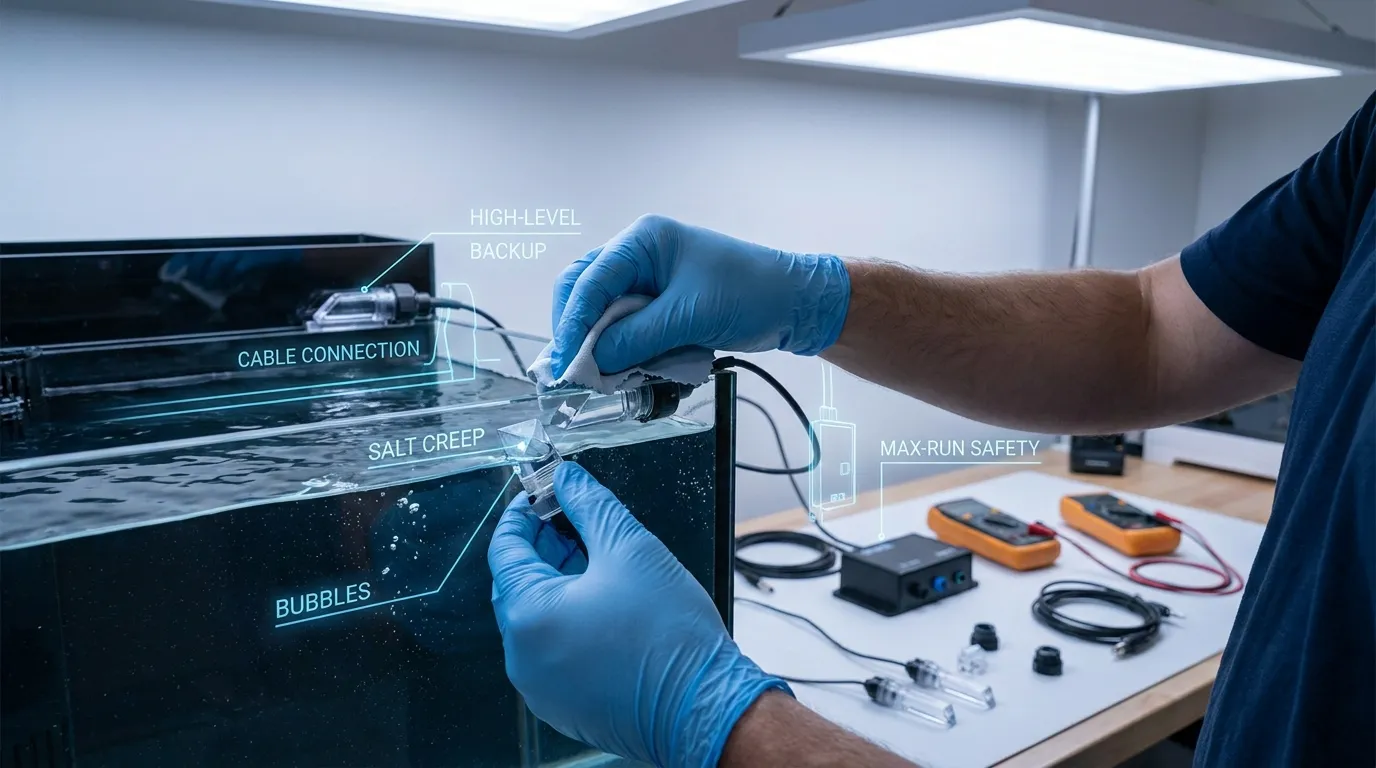
Éteignez la pompe ATO avant de nettoyer. Retirez le capteur ou baissez suffisamment le niveau de l’eau pour accéder au prisme. Essuyez la pointe optique avec un chiffon doux et de l’eau douce. S’il y a du sel durci ou un film minéral, Faites tremper brièvement la pointe et nettoyez doucement. Évitez les outils tranchants, papier sablé, ou un grattage agressif car les rayures peuvent affecter la performance optique.
Un puisard récifal est agressif pour les capteurs car le brouillard salé sèche en cristaux, et le film organique se construit avec le temps. Une routine de nettoyage simple fait souvent la différence entre un contrôle fiable de l’ATO et des faux déclencheurs aléatoires.
Ajouter un capteur redondant pour un fonctionnement ATO plus sûr
Un capteur optique peut contrôler le niveau normal de remplissage, Mais un capteur de haut niveau redondant est fortement recommandé. Montez le capteur de recul, légèrement au-dessus de la conduite d’eau normale. Son rôle n’est pas de contrôler le remplissage quotidien; son rôle est d’arrêter la pompe ATO si le capteur inférieur, Mont, Logique de prise, ou le contrôle de la pompe échoue.
Pour des installations à plus haut risque, Utilisez trois couches de protection:
| Couche de protection | Fonction |
|---|---|
| Capteur optique principal | Démarre et arrête le fonctionnement normal de l’ATO |
| Capteur optique de haut niveau | Arrête l’ATO si l’eau monte trop haut |
| Horaires / Règle du max de points | Arrête l’ATO si le plombage prend trop de temps |
Cette approche en couches est plus fiable que de dépendre uniquement d’un état du capteur.
Notes sur le matériau et la sortie pour capteurs optiques compatibles
Les capteurs Neptune OS-1/OS-1-M sont conçus pour l’écosystème Apex. Si vous cherchez un capteur d’aquarium compatible ou OEM pour votre propre contrôleur, Produit ATO, ou dispositif d’aquarium à marque propre, Les chèques d’achat sont différents.
Confirmez d’abord le matériau humidifié. Les matériaux courants des corps de capteurs optiques incluent le plastique des PSU pour les capteurs compacts de niveau d’eau, PTFE pour la résistance chimique, 316 Acier inoxydable pour applications liquides robustes, et du verre pour des environnements chimiques ou de température spécifiques. Pour l’utilisation sur les ATO récifaux, Le capteur doit tolérer l’exposition à l’eau salée, nettoyage, et une immersion ou contact par éclaboussures à long terme.
Vérifiez aussi la sortie électrique. Les capteurs optiques industriels et OEM peuvent utiliser le NPN, PNP, Commutation de type relais, ou une sortie analogique de 4 à 20 mA selon la carte de contrôle. Les projets ATO en aquarium nécessitent généralement un simple signal numérique humide/sec adapté à l’entrée du contrôleur. Style de filetage, Longueur du câble, Connecteur, Phoque, et la méthode de montage doit être confirmée avant commande.
Si votre objectif n’est pas le remplacement d’Apex mais le matériel d’aquarium personnalisé, HojellyTek fabrique des capteurs photoélectriques de niveau liquide à Shenzhen avec R interne&D, Personnalisation OEM/ODM, et l’expérience d’exportation pour les États-Unis, EU, et les clients indiens. Pour plus de détails, voir notre Capteur optique d’aquarium Page ou le Aquarium Auto Remplissage option.
OS-1 / OS-1-M vs capteur optique d’aquarium compatible
| Objet | Neptune OS-1 / OS-1-M | Direction de capteur d’aquarium compatible |
|---|---|---|
| Meilleure utilisation | Apex / Configuration récifale ATO basée sur FMM | Contrôleur d’aquarium OEM, Dispositif ATO, ou projet de remplacement |
| Montage | Support OS-1 ou support magnétique OS-1-M | Fileté, Tableau, magnétique, ou un boîtier sur mesure |
| Production | Conçu pour l’écosystème Neptune | Confirmer NPN, PNP, Numérique, analogique, ou signal au niveau de la carte |
| Personnalisation | Limité aux accessoires écosystémiques | Matériau de la carrosserie, Câble, Connecteur, Sortie, Le montage peut être spécifié |
| Orientation acheteur | Intégration facile d’Apex | Compatibilité électrique et mécanique |
Pour les acheteurs comparant les options, notre Alternative au capteur Neptune la page explique comment penser à la compatibilité sans supposer l’approbation de Neptune.
FAQ
Comment installer un capteur de niveau optique de Neptune Systems dans un puisard récifal?
Montez l’OS-1 ou l’OS-1-M dans la chambre de retour à la conduite d’eau normale souhaitée, Sécuriser le porte-cartes, branche le capteur sur l’entrée Apex/FMM, confirmer l’état humide/sec dans Apex Fusion, puis configurez la logique de pompe ATO avec délai, Protection max-run, et de préférence un capteur de secours de haut niveau.
Le capteur optique Neptune devrait-il être sous l’eau?
Pour le contrôle de l’ATO, La pointe se trouve à la ligne de flottaison cible. Pendant un niveau normal à pleine intensité, elle peut être humidifiée; lorsque l’évaporation fait baisser l’eau sous la pointe, Il devient sec et déclenche la logique de recharge. Vérifiez toujours l’état réel dans Apex Fusion avant de programmer.
Où dois-je installer le capteur magnétique OS-1-M?
Montez-le sur une paroi stable de la chambre de la pompe de retour, loin des bulles lourdes, Évacuation du skimmer, Turbulence du drain, et vibration de la pompe. La pointe du prisme doit être dégagée de tout obstacle et alignée avec la hauteur de l’eau que vous souhaitez maintenir.
Pourquoi mon capteur optique donne-t-il de faux déclencheurs?
Les raisons courantes incluent le fluage du sel, surface sale du prisme, bulles, Ondulations, Connexion de câble lâche, mauvaise attribution de port FMM, Mouvement des capteurs, ou un mauvais placement près de l’écoulement turbulent. Nettoyez la pointe, Fixez la monture, et ajouter un délai dans la logique ATO.
À quelle fréquence dois-je nettoyer un capteur optique de niveau d’aquarium?
Nettoyez-le dès que vous voyez un film de sel, Algues, ou des lectures incohérentes des capteurs. Dans les puisards récifaux, Un entretien régulier est préférable que d’attendre une panne car le sel séché et le biofilm peuvent affecter la transition optique humide/sèche.
Ai-je besoin d’un second capteur optique pour l’ATO?
Un second capteur de haut niveau est fortement recommandé. Il agit comme une coupure de secours si le capteur principal bloque, se salit, Mouvements, ou si la logique ATO se comporte de manière inattendue. Combinez-le avec un temps de fonctionnement maximal de la pompe pour un fonctionnement plus sûr.
Compatible-Alternative Note
Les capteurs Neptune OS-1 et OS-1-M sont pratiques pour les utilisateurs Apex. Pour les marques d’équipements d’aquarium, Fabricants de contrôleurs, Distributeurs, et les acheteurs OEM qui ont besoin d’un capteur photoélectrique personnalisé pour le niveau d’eau, HojellyTek peut supporter un corps de capteur, Montage, Câble, Connecteur, et correspondance de sortie à l’étape RFQ. Pour discuter d’un capteur d’aquarium compatible ou d’un projet ATO, demande un devis via WhatsApp ou email.


